Docs / for WooCommerce / Getting started with AEO Ultimate for WooCommerce
AEO Ultimate for WooCommerce
Getting started with AEO Ultimate for WooCommerce
AEO Ultimate for WooCommerce makes your store readable to search engines and to the AI assistants people now shop with. This first guide covers the setup: switching modules on, checking what your pages really serve, and making sure every tag has exactly one owner. Watch the walkthrough, or read the guide below.
Read the transcript
0:00 What AEO Ultimate for WooCommerce does
AEO Ultimate for WooCommerce makes your store readable to search engines and to the AI assistants people now shop with. It publishes your products as clean structured data, checks what those engines actually see, and shows you what to fix. Everything is built as a module, and this page is where you switch them on.
0:21 Modules: switch on only what you need
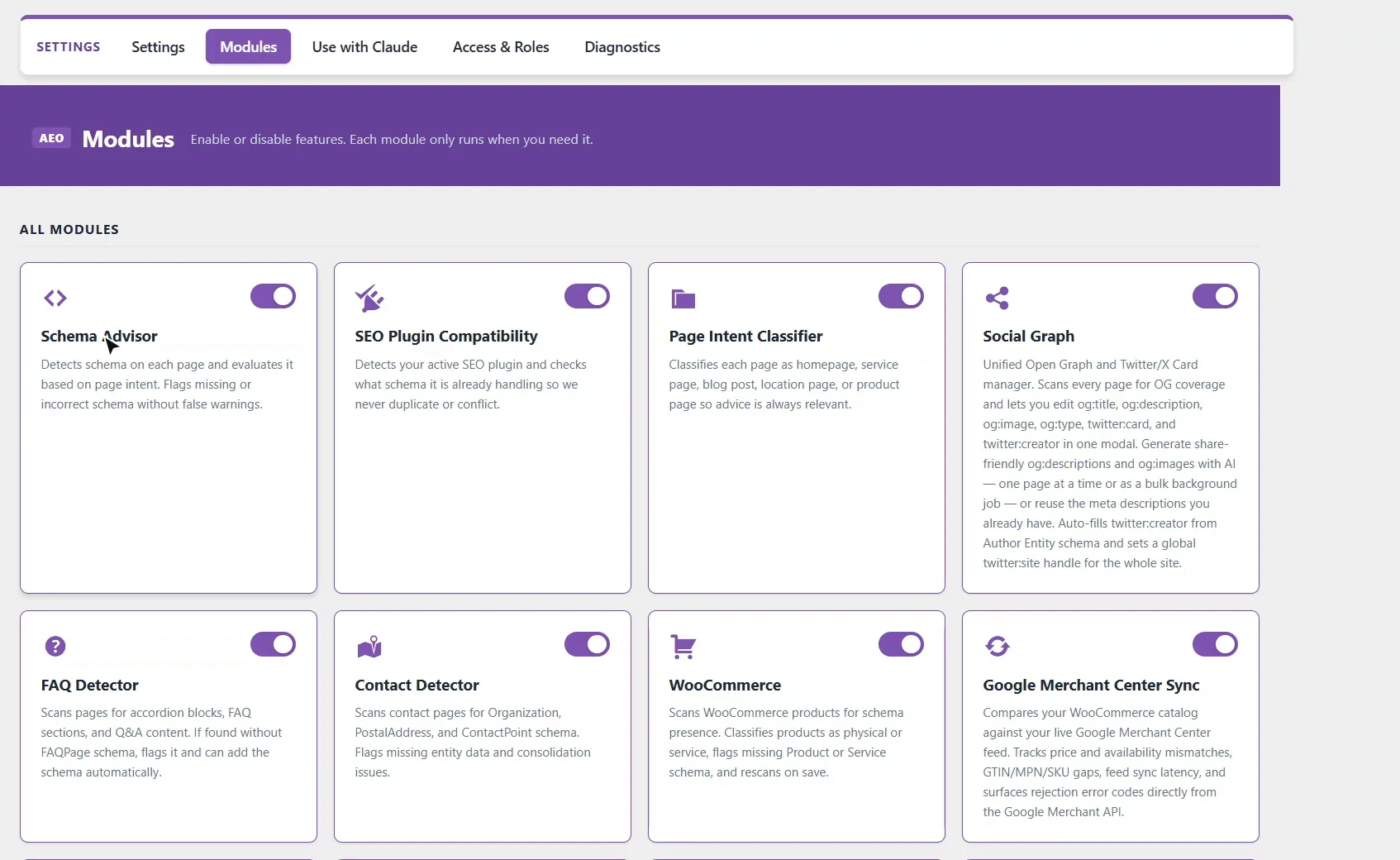
The WooCommerce module is the core: it publishes every product with its live price, stock and shipping. Others are for specific jobs, like Local Store for shops with a counter, or Agentic Checkout, which lets AI agents check out on your store. Anything that calls an AI service is off until you turn it on, and it runs on your own API key.
0:51 The Dashboard
Now the Dashboard. Scan All Pages checks the schema on every page of the store. Below it are the AI meta description settings: pick a provider, and a description is written from the product's real attributes the first time you save it. Imported products are queued and filled in gradually, with a daily limit you set.
1:13 Titles and descriptions, page by page
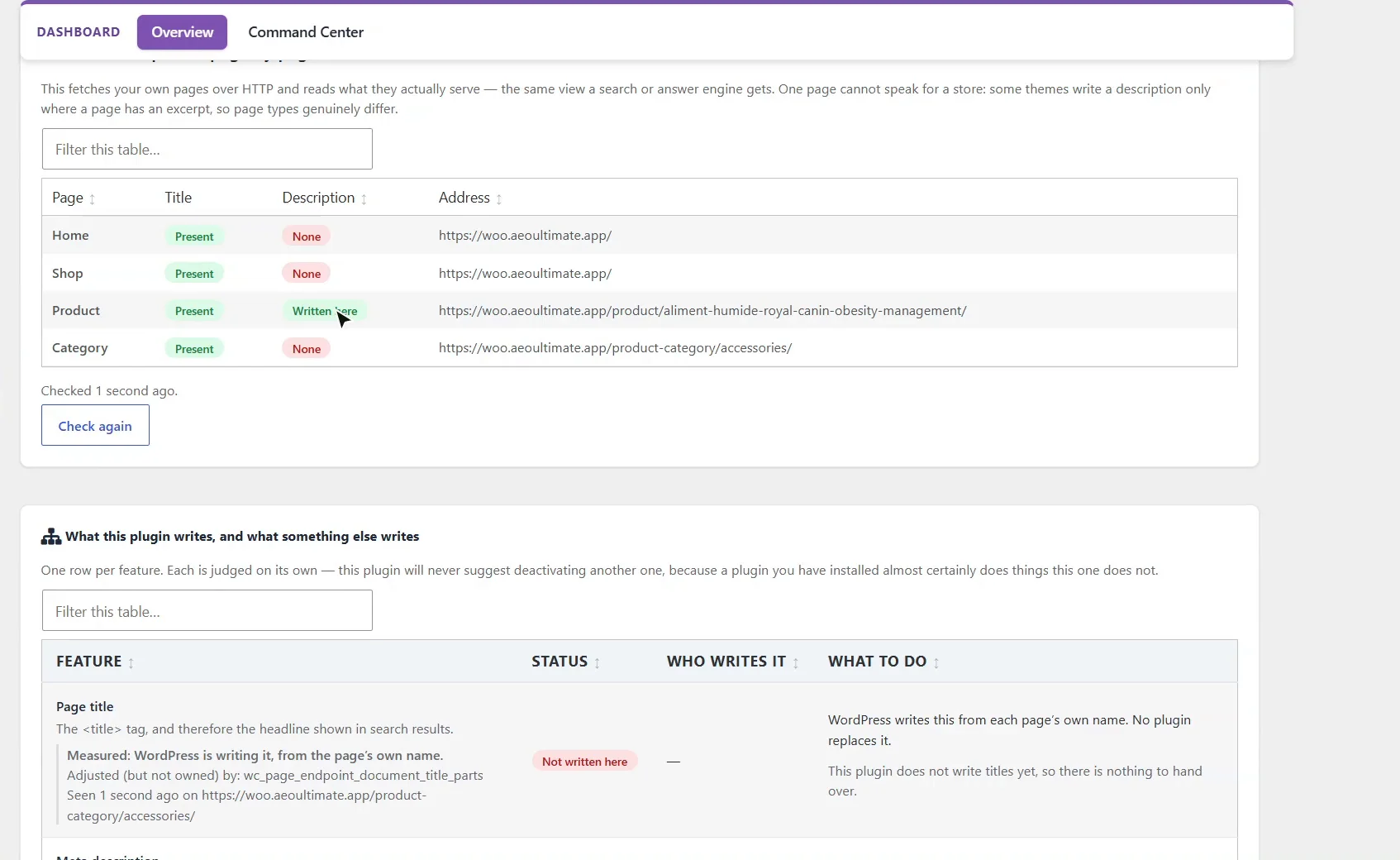
Titles and descriptions, page by page, fetches your own home, shop, product and category pages and reads what they really serve, the same view a search engine gets. Click Check again to refresh it. Here the product page carries a description written by this plugin.
1:32 Who writes what: no duplicate tags
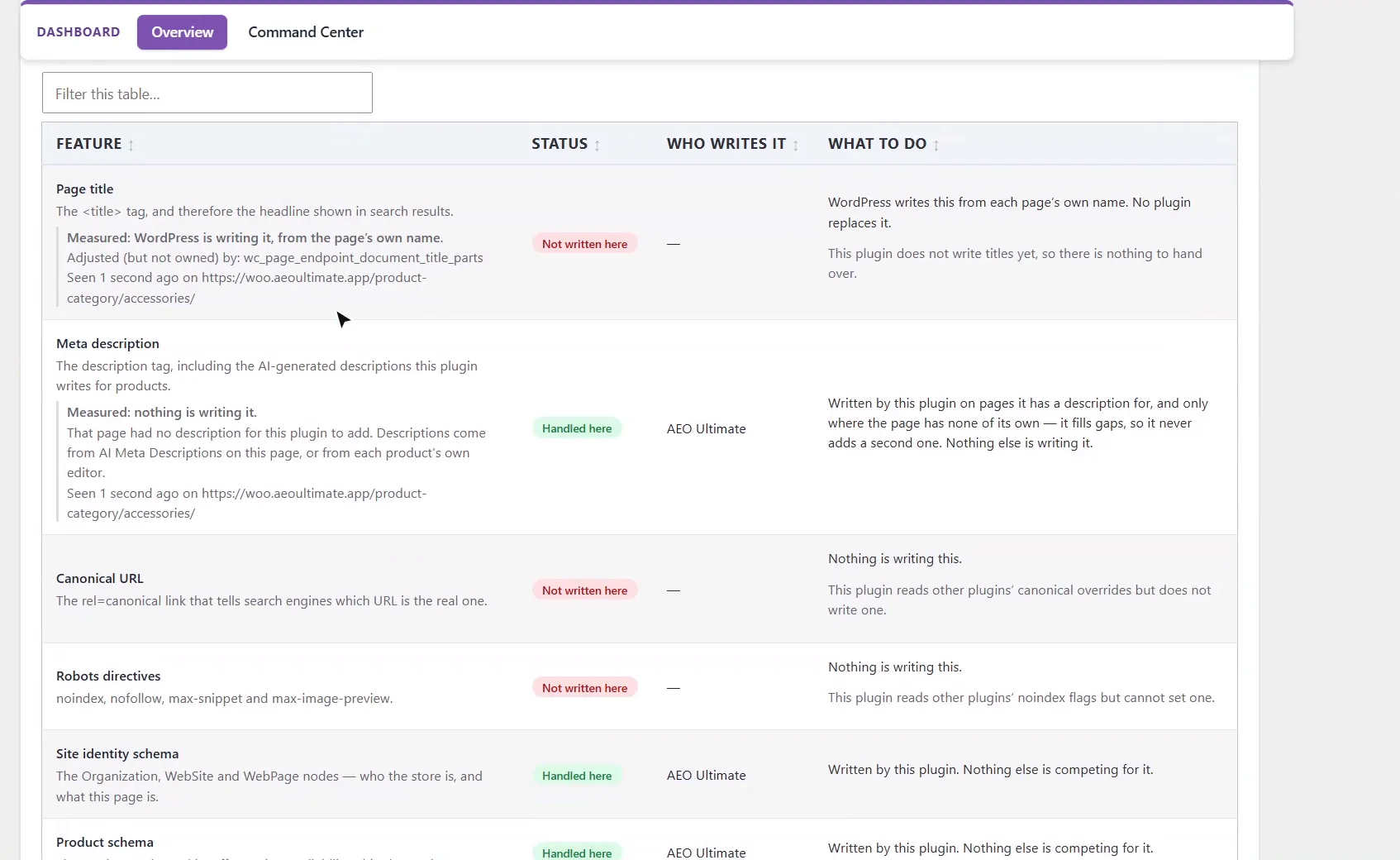
This table answers the question that matters most when you run more than one SEO plugin: who writes each tag. Product schema, breadcrumbs, site identity and llms dot t x t are handled here. Page titles, canonicals and robots tags are not written by this plugin, so it only reads them. If another plugin writes the same thing, both are listed, and you choose the owner. Nothing of theirs is held back unless you tick to confirm it.
2:02 Next: product schema
That's the setup. Switch on the modules you need, check what your pages serve, and make sure each tag has exactly one owner. Next, we'll look at the product schema itself: what Google and AI assistants read on every product page.
What does AEO Ultimate for WooCommerce do?
It publishes every product as structured data (JSON-LD) with its live price, stock and shipping, checks what search engines and AI assistants actually see on your pages, and shows you what to fix. Clean, single-source product data is what lets ChatGPT, Gemini, Perplexity and Google quote your price and stock correctly. Every feature is a module you switch on or off.
How do I switch modules on?
Open AEO Ultimate → Settings → Modules and use the switch on each card. The WooCommerce module is the core: it publishes every product with its live price, stock and shipping. Others are for specific jobs, such as Local Store for shops with a counter, or Agentic Checkout, which lets AI agents check out on your store. Anything that calls an AI service is off until you turn it on, and it runs on your own API key, billed by the provider to your account.
What is on the Dashboard?
Scan All Pages checks the schema on every page of the store. Below it are the AI Meta Descriptions settings: choose Claude, OpenAI or Gemini, and a description is written from the product’s real attributes, category and description the first time you save it. Existing descriptions are never overwritten. Products you import by CSV are queued and filled in gradually in the background, at the pace you choose and with a daily limit you set.
How do I check what my pages actually serve?
Titles & descriptions, page by page fetches your own home, shop, product and category pages over HTTP and reads the title and meta description each one serves, which is the same view a search engine gets. Click Check again to refresh it. Written here means the description came from this plugin, Written elsewhere means another plugin or your theme wrote it, and None means the page has no description.
How does it avoid duplicate tags with Yoast or Rank Math?
The table What this plugin writes, and what something else writes lists each tag and who writes it. Product schema, breadcrumbs, site identity and llms.txt are handled here, and meta descriptions are added only where a page has none of its own. Page titles, canonicals and robots tags are not written by this plugin; it only reads them. If another SEO plugin such as Yoast, Rank Math, All in One SEO or SEOPress writes the same thing, both are listed and you choose the owner. Nothing of theirs is held back unless you tick to confirm it, and their settings are never changed.
What should I set up next?
Next is product schema: the structured data Google and AI assistants read on every product page.
All WooCommerce tutorials
- Getting started
- Product schema
- Agent Ready
- Agentic checkout
- Merchant Center
- Meta descriptions and AI enrichment
- Store trust and reviews
- Local Store
- Smart Collections
- Promotions and price rules
- AI citations and the crawler log
- AI Ready and the schema detector
- The RAG Engine (coming soon)
Next: Product schema →
Still stuck?
Message me directly — free tier included. Most replies land within the hour during Tampa working hours. Get support →