Docs / for Magento / Magento 2 structured data for AI search
AEO Ultimate for Magento
Magento 2 structured data for AI search
Answer engines and search engines read structured data to understand what you sell. AEO Ultimate for Magento 2 publishes one connected JSON-LD graph on every page, built separately for each store view. This guide shows what it publishes, how to check any page, and how to avoid duplicate markup. The examples come from a demo store with sample products.
Read the transcript
0:00 Introduction
Answer engines and search engines read structured data to understand what you sell. AEO Ultimate for Magento 2 publishes one connected JSON-LD graph on every page, built separately for each store view. This guide shows what it publishes, how to check any page, and how to avoid duplicate markup.
0:23 Check a page
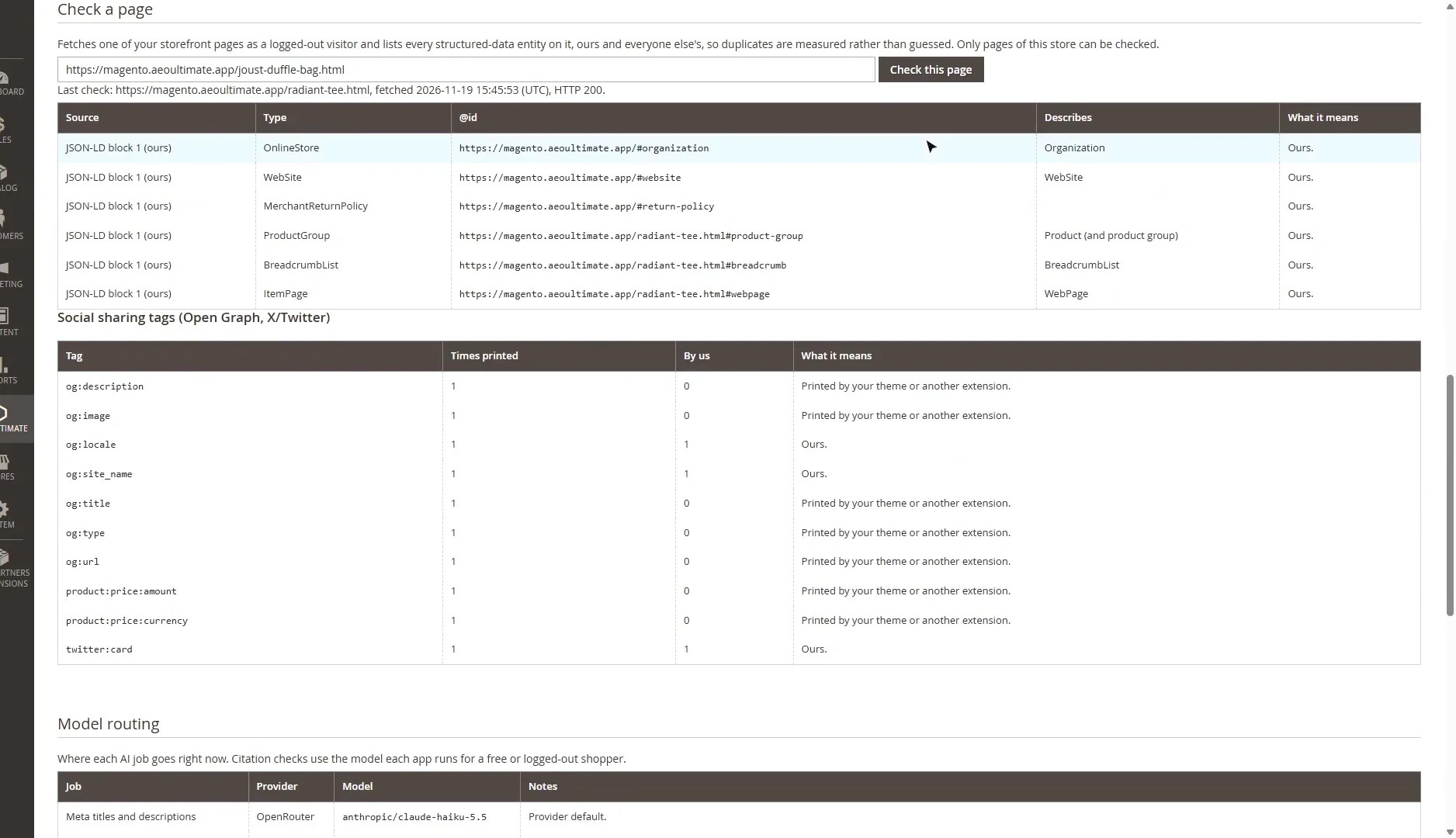
Open the Dashboard and scroll to Check a page. Enter any page from your store, and press Check this page. AEO Ultimate fetches it as a signed-out visitor, and lists every structured data entity it finds, its own and everyone else's. So duplicates are measured, not guessed.
0:42 One connected graph
On this product page, everything comes from one block: the store, the website, the return policy, the page, its breadcrumbs, and the product. Each entity links to the others by its ID, so an answer engine reads one connected description instead of separate fragments.
1:02 Configurable products
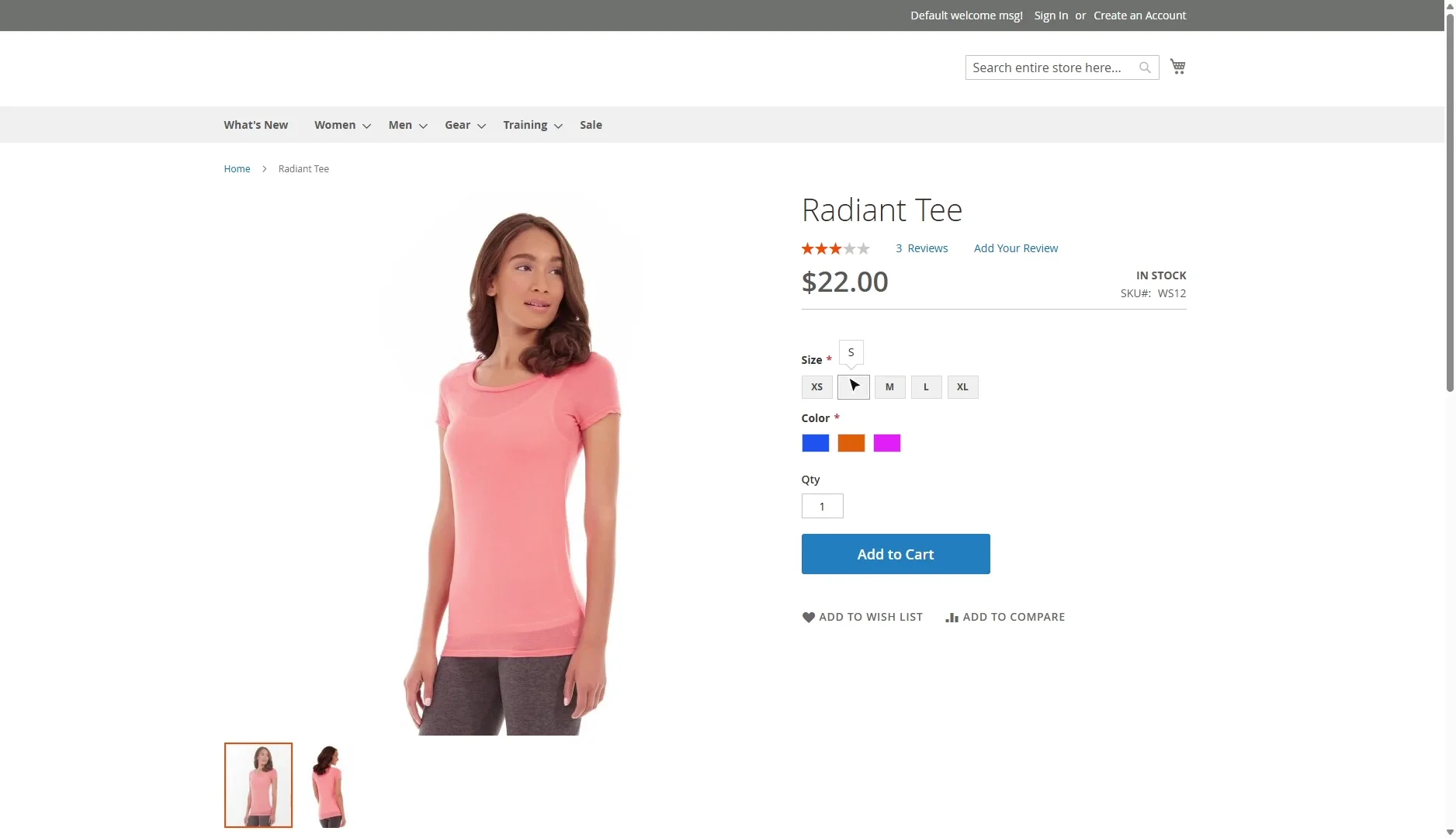
A configurable product is published as a product group, with every variant listed. This tee comes in fifteen combinations of size and colour, and each one has its own SKU, image, price and stock status. Stock is read from each variant, never from the parent product's own flag.
1:23 Prices and offers
Prices are the final prices a signed-out shopper sees, with your tax display settings applied. Customer group and B2B prices are never published. Shipping cost, your return policy and your reviews are added to each offer once you set them up.
1:44 Avoiding duplicates
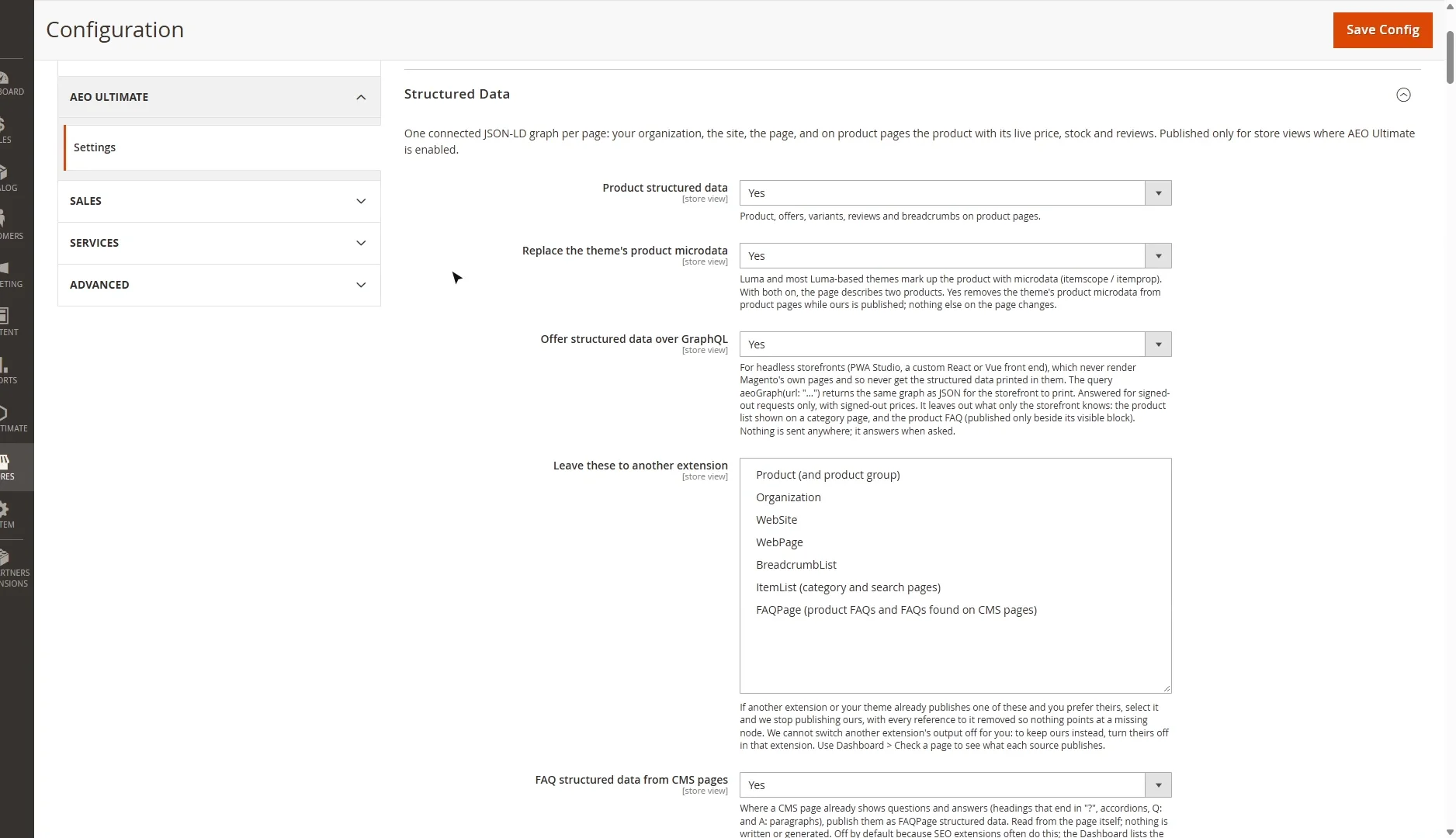
Many Magento themes, including Luma, already mark up products with microdata. With both switched on, the page describes the product twice. Replace the theme's product microdata removes the theme's version while ours is published. If another extension publishes something you would rather keep, select it under Leave these to another extension, and ours steps aside.
2:09 More structured data
The same settings add FAQ structured data from your CMS pages, speakable sections for voice assistants, and a GraphQL query for headless storefronts. Your organization name, logo and official profiles complete your store's identity.
2:27 Check the result
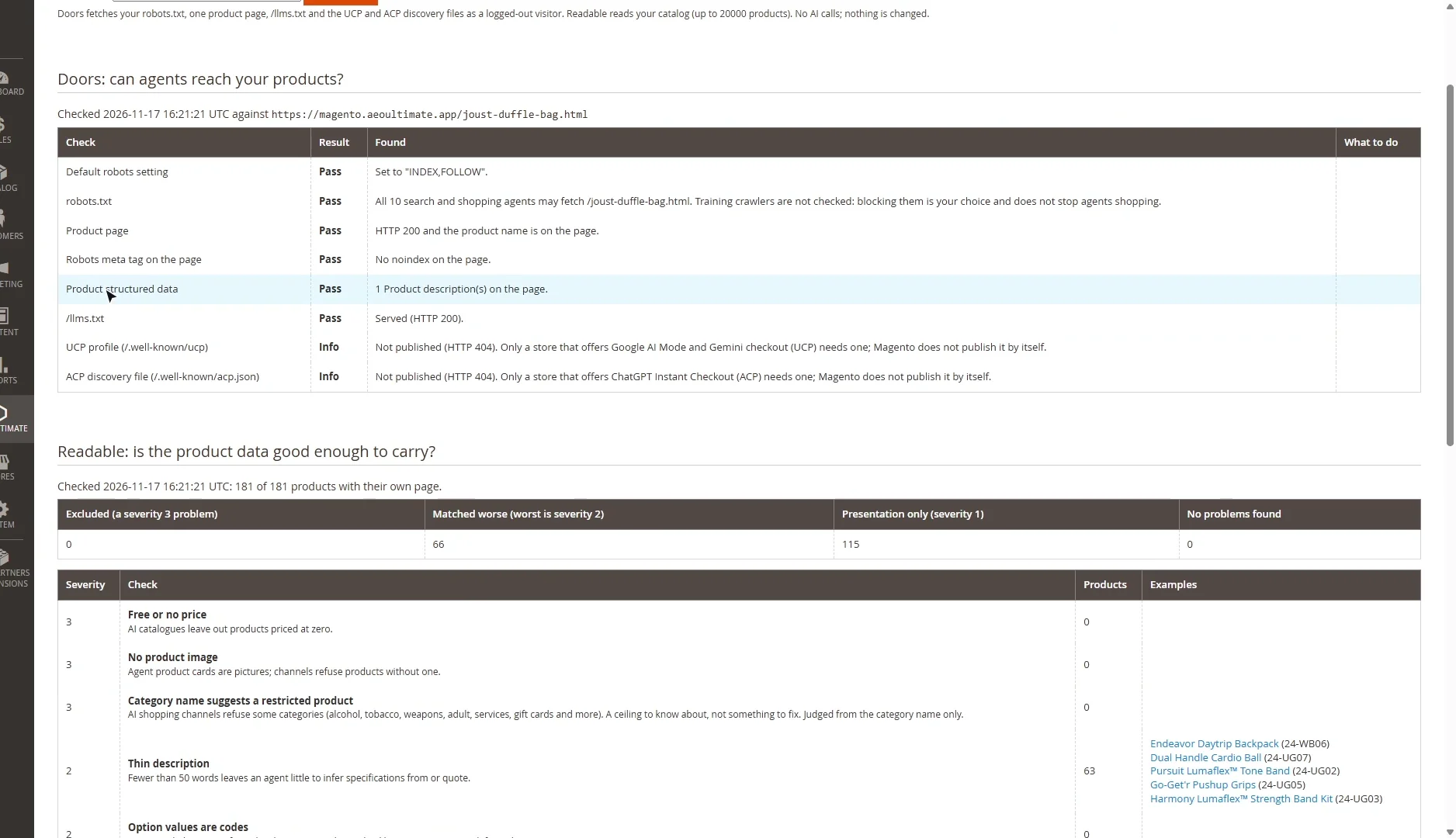
Agent Ready confirms the result. Here, the page has one product description, and the check passes. Run Check a page again after any theme or extension change, so every product keeps one clear description.
How do I see the structured data on a page of my Magento store?
Open AEO Ultimate → Dashboard and scroll to Check a page. Enter any page from your store and press Check this page. AEO Ultimate fetches it as a signed-out visitor and lists every structured data entity it finds, its own and everyone else’s, with what each one means. Duplicates are measured, not guessed. It also lists the Open Graph and X tags on the page, and who printed each one.
What does AEO Ultimate publish on a product page?
One script block holds the whole graph: the store, the website with its search box, the return policy, the page, its breadcrumbs and the product. Each entity points at the others by its @id, so an answer engine reads one connected description instead of separate fragments. Category pages get a CollectionPage with a list of the products shown.
How are configurable products described?
A configurable product is published as a ProductGroup, with every variant listed and the attributes it varies by named. The Radiant Tee on the demo store has fifteen variants by size and colour, and each one has its own SKU, image, price and stock status. Stock is read from each variant, never from the parent product’s own flag. Multi-Source Inventory is optional: stock comes from MSI when it is enabled and from the legacy stock tables when it is not.
Which price does the structured data show?
The final price a signed-out shopper sees, with your tax display settings applied. Customer group and B2B prices are never published. Shipping cost and your return policy, from Settings → Shipping and Returns, and your product reviews are added to each offer once you set them up. Publish only the policy you actually honour: a stated policy is a promise to shoppers.
How do I stop my theme and AEO Ultimate describing a product twice?
Luma and most Luma-based themes already mark up the product with microdata. With both switched on, the page describes two products. In Settings → Structured Data, set Replace the theme’s product microdata to Yes: the theme’s product microdata is removed from product pages while ours is published, and nothing else on the page changes.
If another extension publishes a type you would rather keep, such as the product, your organization, breadcrumbs or FAQs, select it under Leave these to another extension. Ours steps aside, and every reference to it is removed so nothing points at a missing entity. AEO Ultimate cannot switch another extension’s output off for you: to keep ours instead, turn theirs off in that extension. The Dashboard also lists enabled extensions whose names suggest they publish SEO markup.
What else can the structured data settings add?
FAQ structured data from CMS pages that already show questions and answers (off by default, since SEO extensions often do this), speakable sections for voice assistants, and an aeoGraph GraphQL query that returns the same graph to headless storefronts such as PWA Studio, answered for signed-out requests only. Your organization name, logo and official profiles complete your store’s identity.
How do I know it worked?
Run Agent Ready. Its Product structured data check counts the product descriptions on a product page: one passes, and more than one warns and points you to Check a page. Run Check a page again after any theme or extension change, so every product keeps one clear description.
Next is AI Content: product descriptions, meta tags and FAQs written with your own AI key, with every change undoable.
Magento® is a registered trademark of Adobe Inc. AEO Ultimate is made by Tampa Web Technologies Inc. and is not affiliated with Adobe.
Still stuck?
Message me directly — free tier included. Most replies land within the hour during Tampa working hours. Get support →