Docs / for Shopify / The Claude connector for Shopify: set up and all 47 tools
AEO Ultimate for Shopify
The Claude connector: ask Claude about your store
On the Mid and Pro plans, AEO Ultimate works with Claude. Ask Claude what is holding your products back in AI answers, which pages Google has not indexed and what to fix first, and let it make the fixes you approve. Below the setup steps is the full list of the connector’s 47 tools.
What can I ask Claude about my store?
You ask in plain words and Claude picks the right tool. For example: “What is holding my products back in AI answers, and what should I fix first?”, “Which of my pages has Google not indexed, and why?”, “Can AI shopping agents reach my products?”, “Which products are missing image alt text? Write it for them.”, “Who do ChatGPT and Perplexity cite instead of my store?”, “Find old links that no longer work and redirect them” or “Undo the last change you made.”
Can Claude see my orders or change my store without asking?
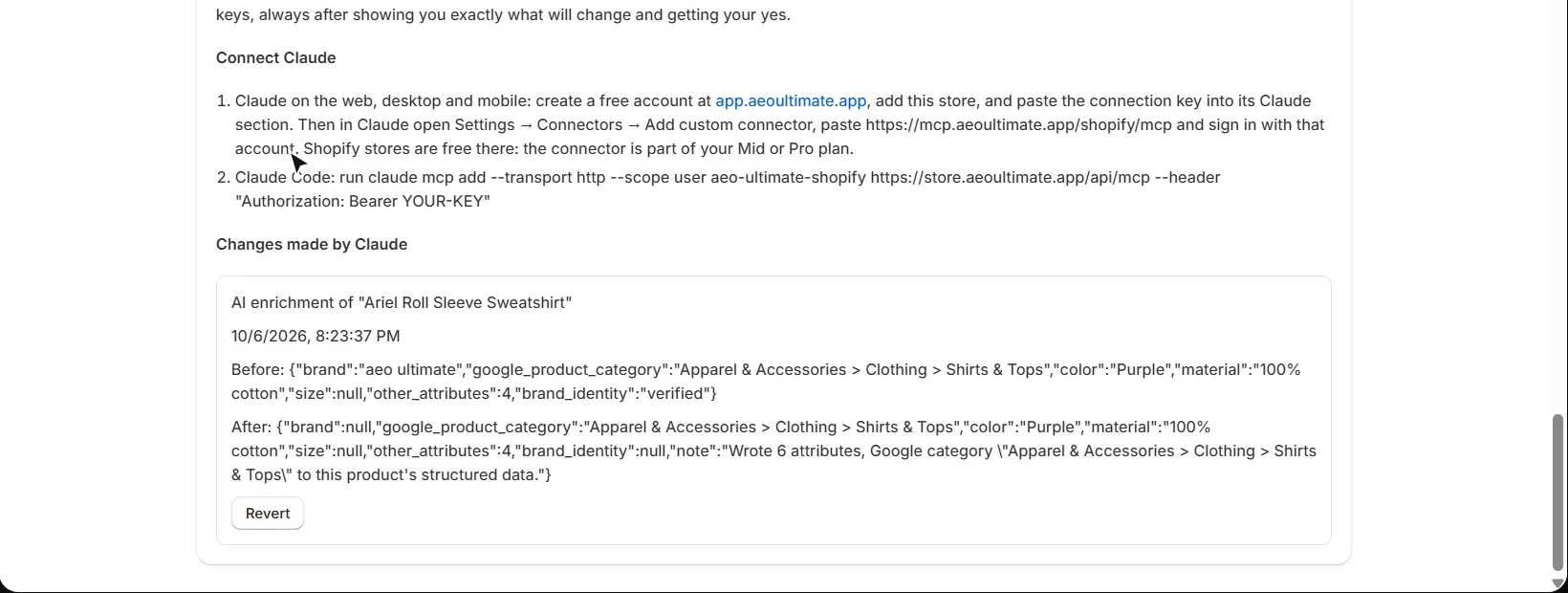
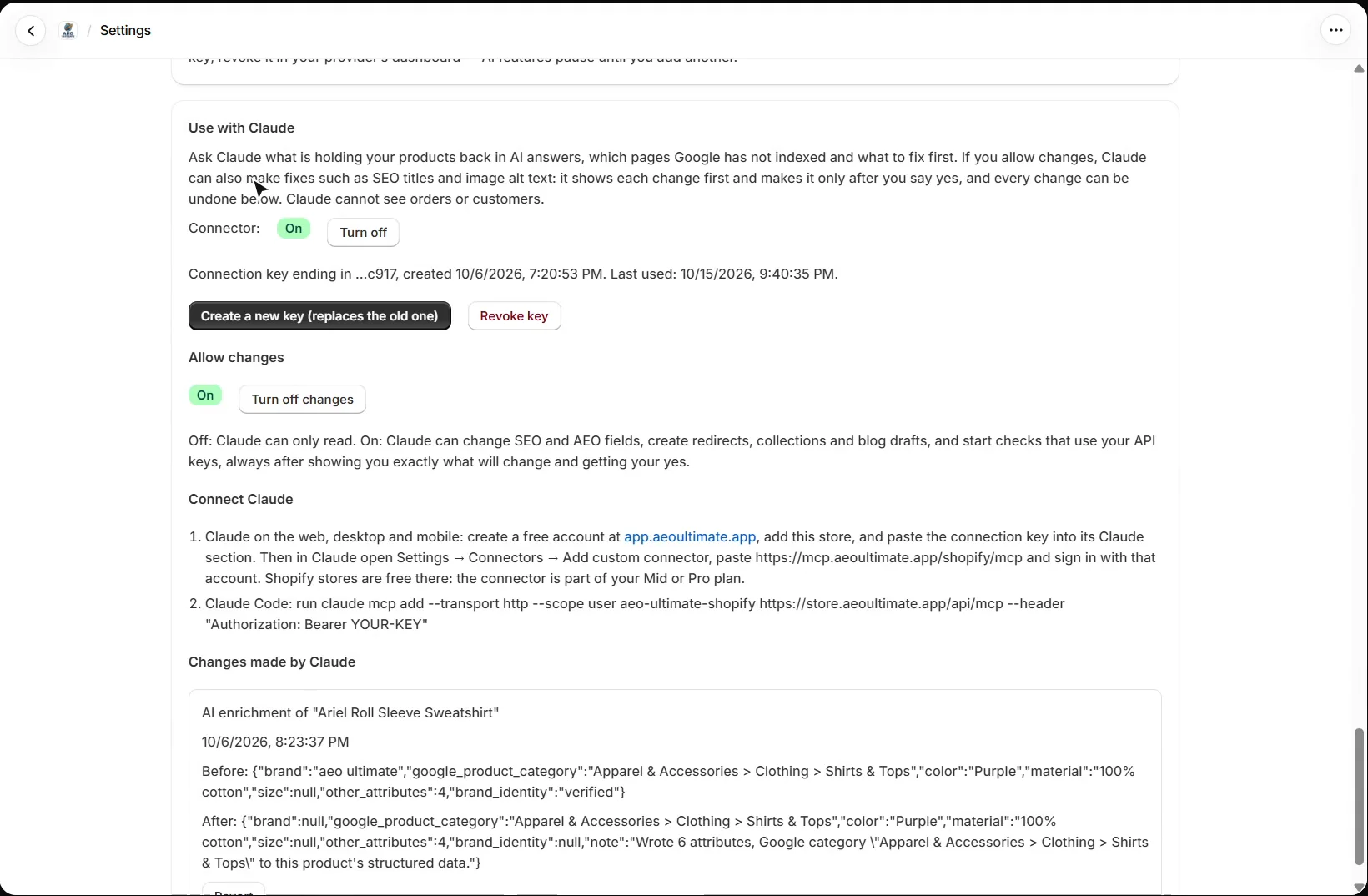
No. Claude cannot see orders or customers. With Allow changes off, it can only read. With it on, Claude can change SEO and AEO fields, create redirects, collections and blog drafts, and start checks that use your API keys, but it always shows exactly what will change first and makes the change only after you say yes. Every change is listed in Settings with what it was before and after, and most can be undone with one click. A few reach outside your store, such as sending URLs to IndexNow or starting an AI visibility run, and those say so before you confirm, because they cannot be undone.
How do I connect Claude to my Shopify store?
In AEO Ultimate, open Settings → Use with Claude, turn the connector on and create a connection key. It is shown only once, so keep it private; you can replace it or revoke it at any time.
Claude on the web, desktop and mobile: create a free account at app.aeoultimate.app, add your store and paste the connection key into its Claude section. Then in Claude open Settings → Connectors → Add custom connector, paste https://mcp.aeoultimate.app/shopify/mcp and sign in with that account. Shopify stores are free there: the connector is part of your Mid or Pro plan.
Claude Code: run the one-line command shown on the same Settings page, with your key in place of YOUR-KEY.
What can the Claude connector do? All 47 tools
Each tool shows the plan it needs; tools marked “makes a change” need Allow changes on and your yes. You do not need to remember any of these names: ask Claude in your own words.
Your store and products
- Get store AEO overview (Mid): every finding about your store’s AI-search readiness, ranked by how much it matters.
- Search products (Mid): finds products by title or SKU.
- Get AEO report for a product (Mid): everything known about one product: SEO title and description, images and alt text, category, barcodes and structured data.
- Get catalog issues (Mid): products with problems such as no barcode, a thin description or no product type.
- Get image alt-text gaps (Mid): products whose images have no alt text, worst first.
- Get product content gaps (Mid): products missing an FAQ, social share text or a meta description.
- Enrich a product with AI (Mid, makes a change): runs AI enrichment on one product with your own AI key (cannot be undone).
Meta tags and product content
- Set a product’s SEO title and meta description (Mid, makes a change): the headline and snippet shown in search results.
- Set image alt text (Mid, makes a change): saves alt text for a product’s images.
- Set a product’s FAQ (Mid, makes a change): the questions and answers published as FAQ structured data, which AI answers can quote.
- Set a product’s social share text (Mid, makes a change): the title and description shown when the product is shared.
- Get meta tag templates (Mid): your SEO title and description templates, their variables and length limits.
- Save meta tag templates (Mid, makes a change): saves your templates.
- Apply meta tag templates to products (Mid, makes a change): writes the templates to up to 25 products at a time, filling empty fields only unless you ask otherwise.
- Get duplicate meta descriptions and SEO titles (Mid): products that share the same text.
Google, links and indexing
- Get Google Search Console data (Mid): your top searches and pages, with the near-misses marked.
- Get Google index status (Mid): pages Google has not indexed, with Google’s own reason.
- Start a Google index check (Mid, makes a change): checks up to 200 pages against Google, on its free daily quota.
- Get lost links (Mid): old addresses that now land on a 404.
- Create URL redirects (Mid, makes a change): creates 301 redirects, up to 25 at a time.
- Get IndexNow status (Mid): your IndexNow key and last submission.
- Submit store URLs to IndexNow (Mid, makes a change): sends your URLs to Bing, Yandex and the other IndexNow engines (cannot be undone).
- Turn IndexNow auto-push on or off (Pro, makes a change): sends each product you save to IndexNow automatically.
- Get Google Merchant Center audit (Mid): how your products match your Merchant Center account.
- Get Merchant Center feed readiness for Gemini and AI Mode (Mid): items Google refused or shows less, and missing brand, GTIN and apparel details.
- Get collection gaps from search demand (Mid): buying-intent searches no collection covers yet.
- Create a collection (Pro, makes a change): creates an empty, unpublished collection.
AI shopping agents
- Get AI shopping agent readiness (Mid): whether AI shopping agents can reach your store and read its products.
- Get a product as an AI shopping agent sees it (Mid): one product exactly as Shopify Catalog serves it to an agent.
AI visibility and crawlers
- Get AI Visibility results (Pro): your latest AI visibility run: where you were cited, named or absent.
- Get domains AI answers cite instead (Pro): the websites AI answers send shoppers to instead of you.
- Start an AI Visibility run (Pro, makes a change): asks the assistants your shoppers’ questions on your own keys (cannot be undone).
- Get AI crawler visits (Pro): AI crawler visits to your llms.txt and knowledge files.
Brand, trust and content
- Get organization profile (Mid): your store’s Organization details and social profiles.
- Update organization profile (Mid, makes a change): changes those details.
- Get product ratings and review sources (Mid): star ratings from your reviews app, and your review profiles.
- Get store trust report (Pro): your Store Trust score and what to fix.
- Get schema audit (Pro): a page’s structured data as crawlers see it.
- Get content uniqueness (Pro): whether a product description is its own or shared with other sites.
- Check a description against the web (Pro, makes a change): searches the web for a description’s distinctive phrases with your search key (cannot be undone).
- Get blogs and posts (Mid): your blogs and most recent posts.
- Save a blog post draft (Mid, makes a change): saves a post as an unpublished draft.
Your documents (RAG Engine)
- Get RAG Engine documents (Pro): the documents you added, with their type and passages.
- Search the store’s documents (Pro): finds the passages that answer a question.
- Get RAG Engine opportunities (Pro): facts your documents state that your product pages leave out, and more.
Changes
- Get changes made through Claude (Mid): the last 50 changes, with before and after.
- Undo a change (Mid, makes a change): puts back exactly what one change replaced.
What should I read next?
That is the last of the walkthroughs. Every one is listed in the Shopify video tutorials.
Still stuck?
Message me directly — free tier included. Most replies land within the hour during Tampa working hours. Get support →