Docs / for WordPress / RAG Engine: find the answers your WordPress site is missing
AEO Ultimate for WordPress
RAG Engine: find the answers your site is missing
AI assistants answer from short passages, not whole pages. The RAG Engine shows your site the way that process sees it, and finds the answers your site is missing in the documents you already have: spec sheets, manuals, guides and FAQs. Watch the walkthrough, or read the guide below.
Read the transcript
0:00 What RAG is, and what the RAG Engine does
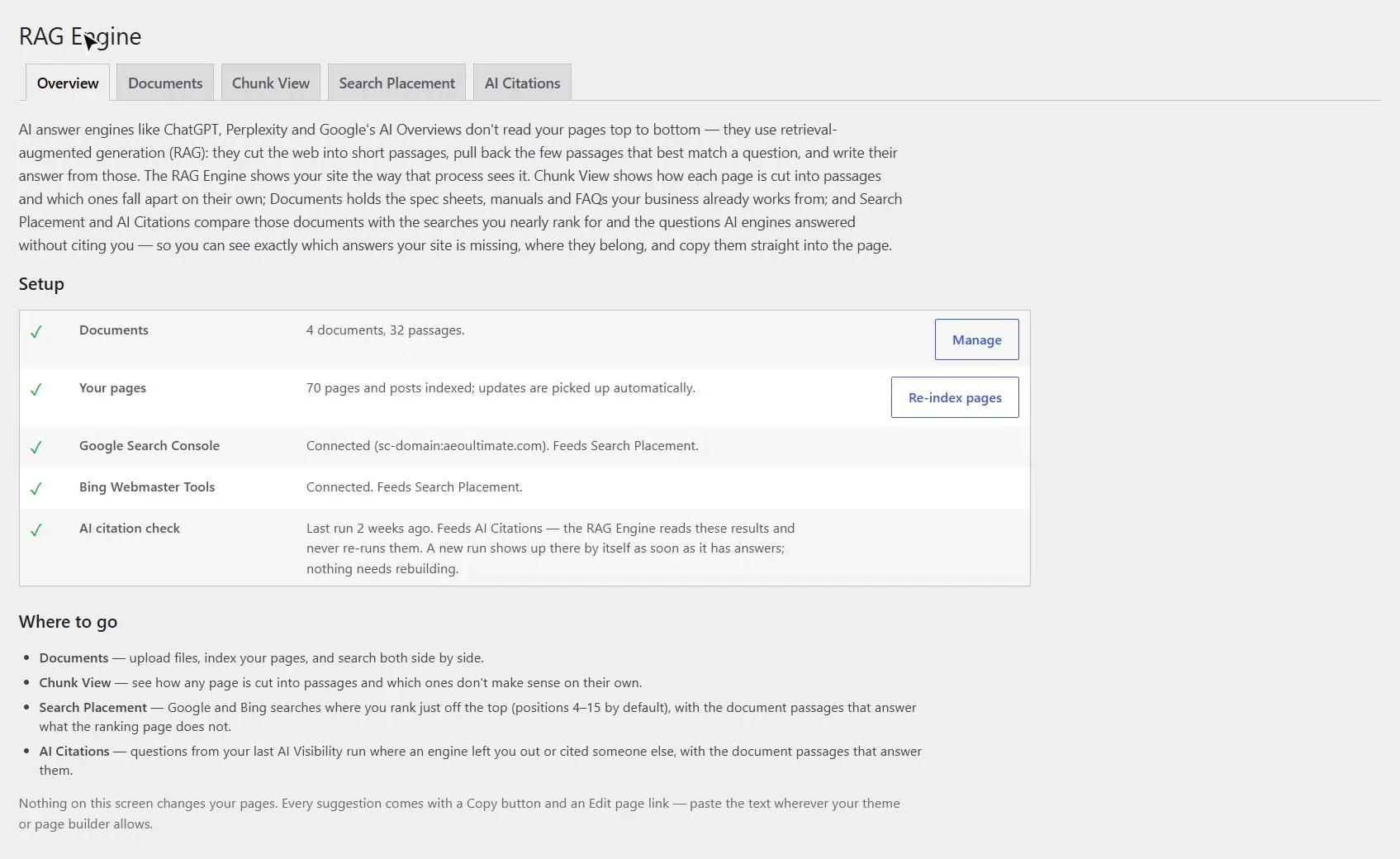
AI assistants don't read your pages top to bottom. They cut the web into short passages, pull back the few that best match a question, and write their answer from those. That's retrieval-augmented generation, or RAG. The RAG Engine shows your site the way that process sees it, and finds the answers your site is missing in documents you already have. Setup shows what feeds it: your documents, your pages, Search Console, Bing, and your AI Visibility results.
0:35 Documents: the answers you already have
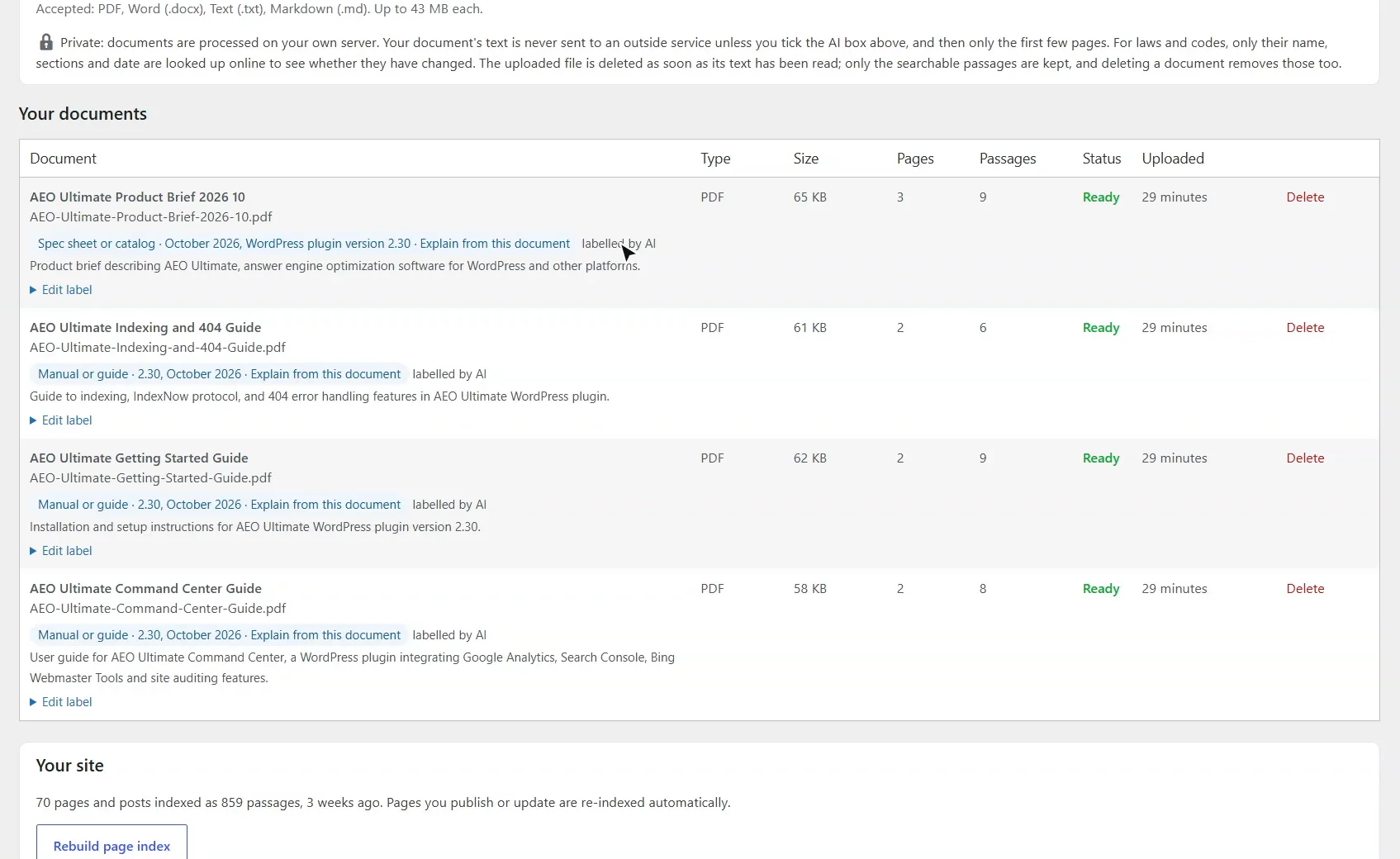
Documents holds the files your business already works from: spec sheets, manuals, guides and FAQs. They're read on your own server and cut into passages. With AI labelling on, the first few pages go to your AI provider once, to label each document; leave it off for anything confidential. Here are four guides, each labelled and split into sections under its own questions.
1:04 Search your documents and your site side by side
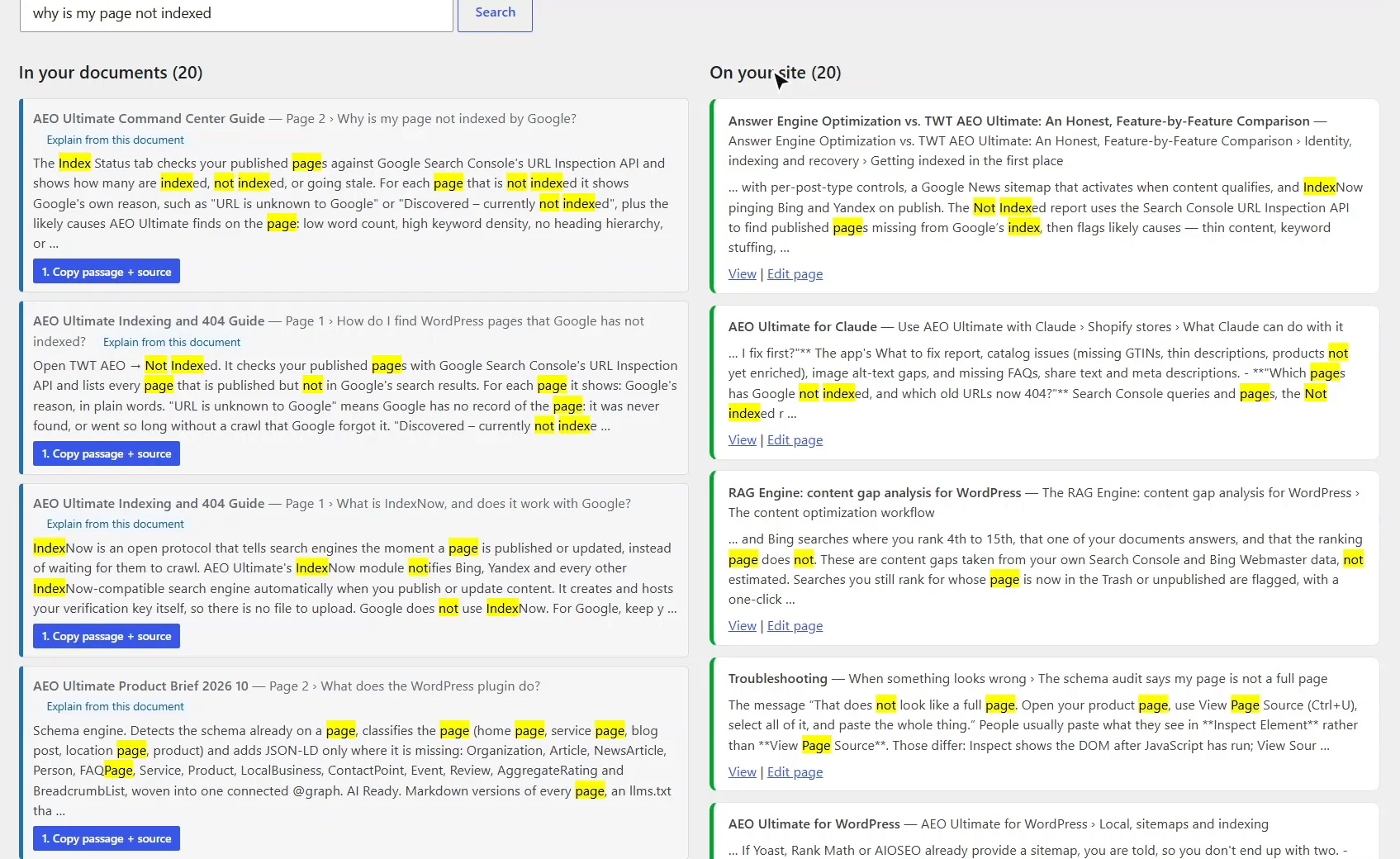
Search both side by side. Ask why is my page not indexed. On the left, our Command Center guide answers it directly, under that exact heading. On the right, your own pages. When a document answers a question better than any page does, that's content your site is missing.
1:27 Chunk View: how a page is cut into passages
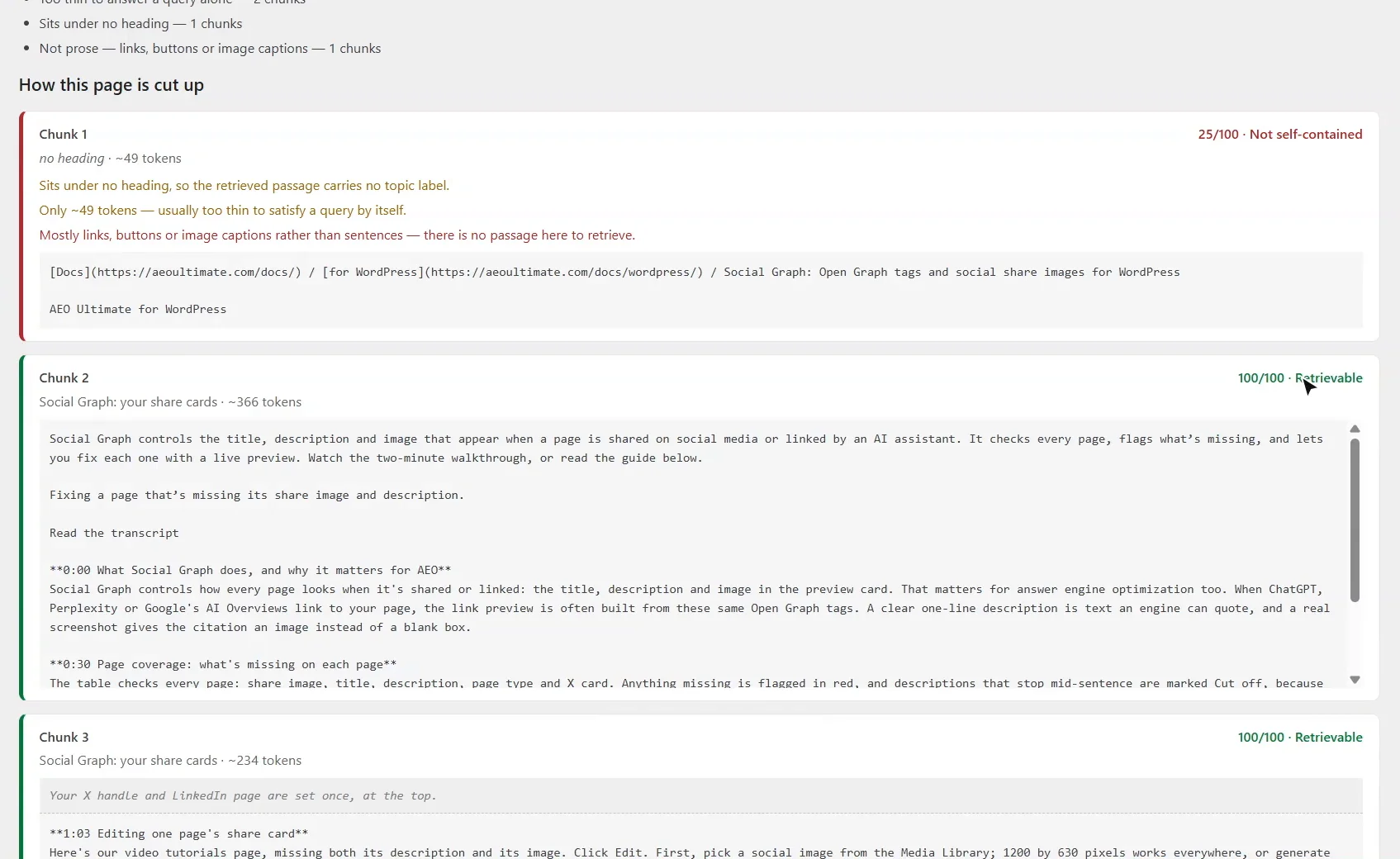
Chunk View shows how any page is cut into passages, and scores each one on whether it makes sense on its own. On our Social Graph guide, the breadcrumb at the top is too thin to answer anything, while the sections under clear headings score a hundred out of a hundred.
1:46 Search Placement: searches you nearly win
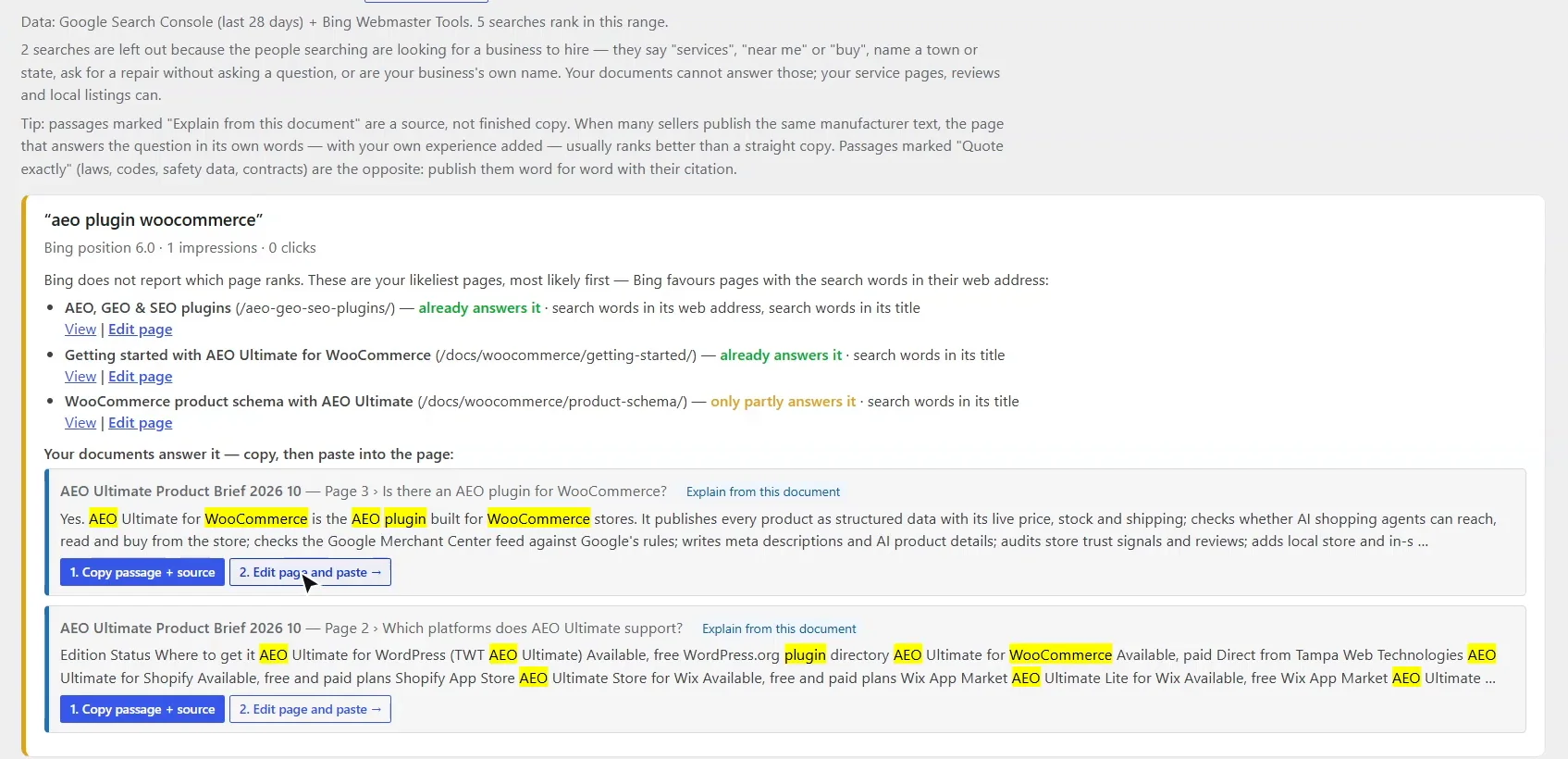
Search Placement takes the Google and Bing searches you rank fourth to fifteenth for, just off the top, and checks whether your documents answer them better than the page that ranks. For aeo plugin WooCommerce, Bing doesn't say which page ranks, so you get the likeliest ones, and the passage from our product brief that answers it. Copy it, then click Edit page and paste.
2:13 AI Citations: questions AI answered without you
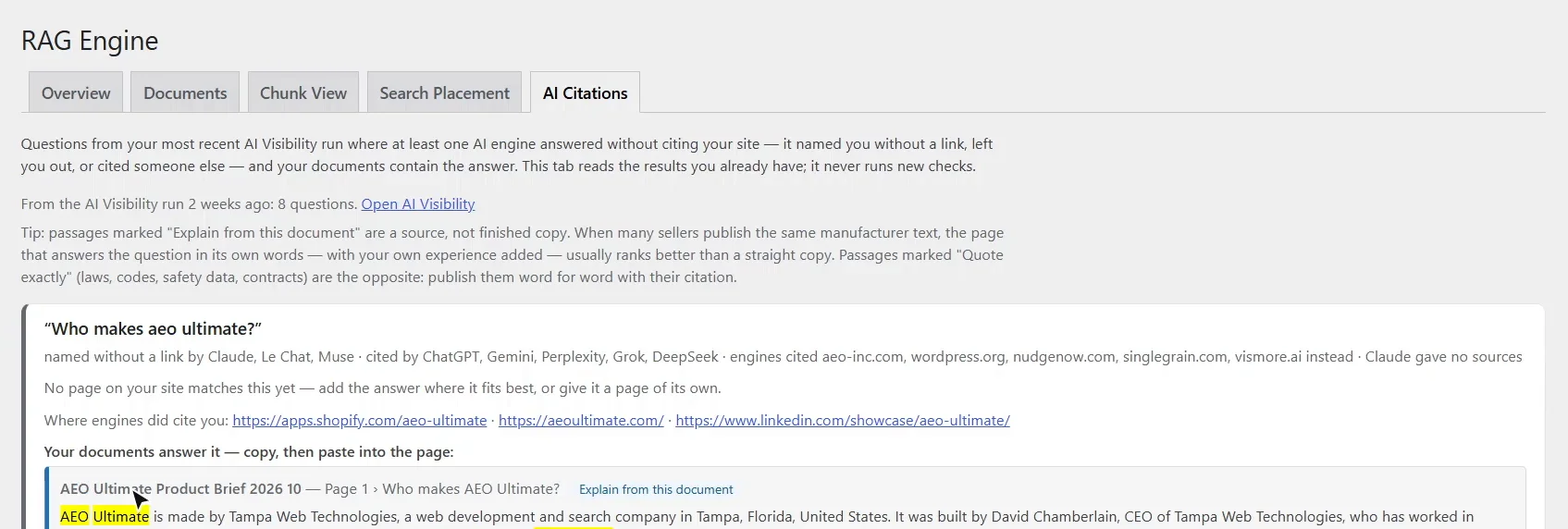
AI Citations reads your last AI Visibility run, and never runs a new one. For each question where an engine left you out, or named you without a link, it finds the passage in your documents that answers it. Asked who makes AEO Ultimate, three engines named us without a link, and the answer was already in our product brief.
2:35 Next questions: where the conversation goes
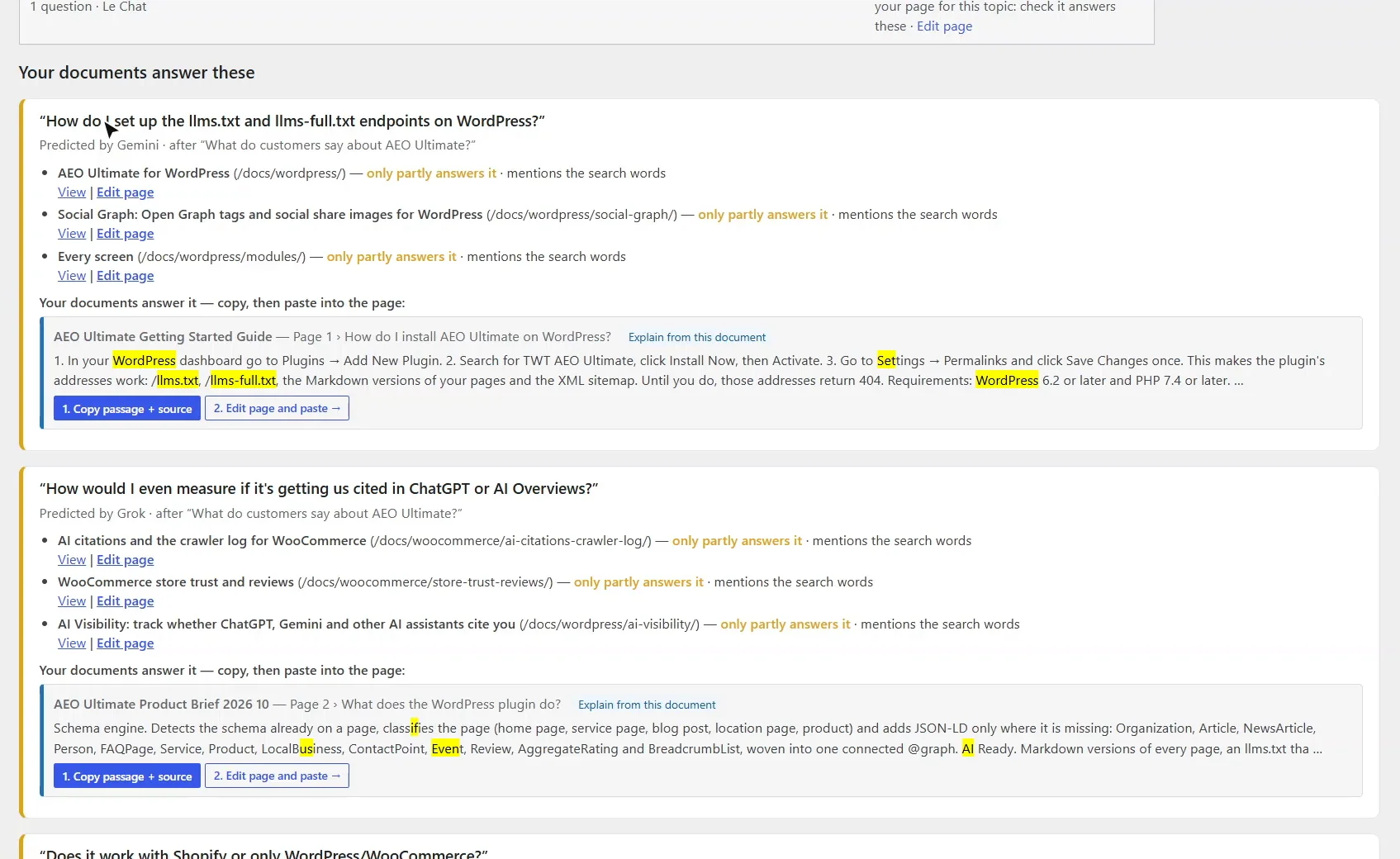
Further down, Next questions: the follow-ups each engine expects the buyer to ask, checked against your pages and your documents. Questions about your business are grouped by topic, with your closest page; the ones your documents answer come with the passage to copy.
2:53 Copy, edit, publish
Nothing here changes your pages. Every suggestion is a passage to copy and paste wherever your theme allows. Treat it as a source, not finished copy: answer in your own words, and add your own experience. Thanks for watching.
What is the RAG Engine?
AI answer engines such as ChatGPT, Perplexity and Google’s AI Overviews use retrieval-augmented generation (RAG): they cut the web into short passages, pull back the few that best match a question, and write their answer from those. The RAG Engine, at TWT AEO → RAG Engine, shows your site the way that process sees it. The Overview tab shows what feeds it — your documents, your pages, Google Search Console, Bing Webmaster Tools and your last AI Visibility run — and says plainly when one of them is not set up yet, with a link to where to fix it. For the bigger picture, see RAG Engine: content gap analysis for WordPress.
How do I add documents to the RAG Engine?
Open the Documents tab and upload PDF, Word (.docx), text or Markdown files: the spec sheets, manuals, catalogues, guides and FAQs your business already works from. Each one is read on your own server and cut into passages; the uploaded file is then deleted, and only the searchable passages are kept. PDFs are split into sections by their own headings, including headings written as questions, so each passage carries the question it answers.
With AI labelling on, the first few pages of each document go to your AI provider once, to label what kind of document it is, its edition and what to cite it as. Leave it off for anything confidential: the document is then labelled on your server from its text, and you can correct any label yourself.
How do I search my documents and my site together?
At the bottom of the Documents tab, Search documents and site runs one search over both and shows the results side by side: passages from your documents on the left, your own pages on the right. When a document answers a question better than any page does, that is content your site is missing.
What does Chunk View show?
Chunk View shows how any page — yours, or a competitor’s by its address — is cut into passages, and scores each one out of 100 on whether it makes sense on its own. It flags passages that sit under no heading, are too thin to answer anything, are mostly links or buttons rather than sentences, or point back to text that is no longer there (“as mentioned above”).
What is Search Placement?
Search Placement takes the Google and Bing searches you rank just off the top for — positions 4 to 15 by default, which you can change — and shows the ones your documents answer and the ranking page does not. Google names the page that ranks; Bing does not, so you get the likeliest pages, with the search words in their web address first, the way Bing behaves. Searches from people looking for a business to hire (“near me”, “services”, a town) are left out, because a document cannot answer those; your service pages, reviews and local listings can.
How does AI Citations find answers the AI engines missed?
AI Citations reads your most recent AI Visibility run — it never runs a new one — and lists the questions where at least one engine named you without a link, left you out or cited someone else, together with the passage in your documents that answers each one. A passage headed by the question comes first.
What are Next questions?
With each answer, the AI engines predict what the buyer is likely to ask next. Next questions checks those follow-ups against your pages and your documents. Questions about your business itself are grouped by topic, with your closest page; the ones your documents answer come with the passage to copy. They are each engine’s prediction, not questions real people typed, so treat them as a map of where the conversation goes.
Will the RAG Engine change my pages?
No. Every suggestion is a passage with two buttons: Copy passage + source, then Edit page and paste, which opens the page in your editor so you can paste it wherever your theme or page builder allows. Passages marked Explain from this document are a source: answer in your own words and add your own experience. Passages marked Quote exactly — laws, codes, safety data sheets, contracts — are the opposite: publish them word for word, with their citation.
A source, not finished copy
When many sellers publish the same manufacturer text, the page that answers the question in its own words, with real experience added, usually does better than a straight copy. Use the passage to get the facts right, then write the answer your customers need.
Something not adding up? See Troubleshooting or ask in the support forum.
Still stuck?
Message me directly — free tier included. Most replies land within the hour during Tampa working hours. Get support →