Docs / for WordPress / AI Visibility: track whether ChatGPT, Gemini and other AI assistants cite you
AEO Ultimate for WordPress
AI Visibility: do the assistants cite you?
AI Visibility asks ChatGPT, Gemini, Claude, Perplexity, Grok, Le Chat, DeepSeek and Muse the questions your buyers ask, on your own API keys, and records whether each answer linked to you, named you, or left you out, and who was cited instead. Watch the tour of real results for aeoultimate.com, or read the guide below.
Read the transcript
0:00 What AI Visibility does
AI Visibility answers one question: when people ask ChatGPT, Gemini, Claude and the other assistants about your business, do they cite you? It asks eight AI engines the questions your buyers ask, on your own API keys, and records whether each answer linked to you, named you, or left you out — and who got cited instead. These are real results for aeoultimate. com.
0:27 AI referrals: who sends visitors
First, AI referrals: the assistants that actually sent visitors in the last 28 days, from Google Analytics, next to your top Search Console and Bing queries.
0:38 Engines and your own API keys
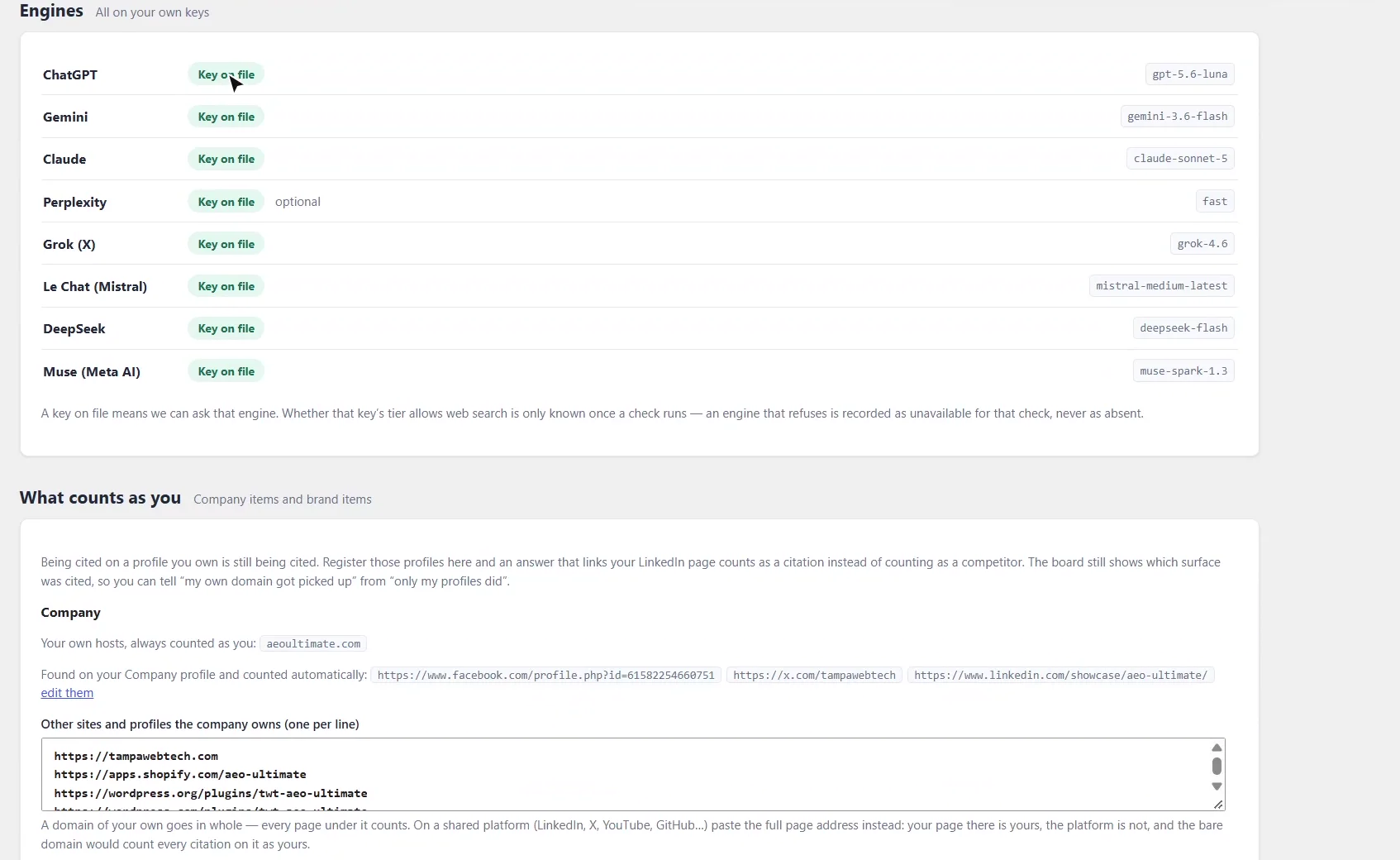
Engines lists each assistant and the model it uses. Every check runs on your own key, so you pay your AI provider directly, and nothing runs until you press Start.
0:49 What counts as you
What counts as you tells AEO Ultimate which links are yours. Your own domain always counts, and the profiles on your Company profile are added automatically. Add any other sites you own, and track each brand separately, with the phrases to watch for.
1:07 Who is asking: buyer personas
Who is asking adds buyer personas. AI assistants tailor their answers to the person asking, so you can run the same questions as an SEO professional, a WordPress site owner, or any buyer you choose, and see how the answers change.
1:22 Allocation, questions and running a check
Allocation sets how many questions to ask at each level — your company, brands, categories, products and posts — and shows the total number of checks before anything is spent. When you run, choose who to ask as, where to search from, and whether to follow the conversation into each engine's own follow-up question.
1:43 Results: cited, named and wrong answers
Now the results. In this run, asked as an SEO professional, aeoultimate. com was cited in 73 percent of answers and named in every one, with no wrong answers. Each engine gets its own score: Gemini, Perplexity, Grok and DeepSeek cited us every time they answered, while Le Chat named us but never linked.
2:07 Who gets cited instead
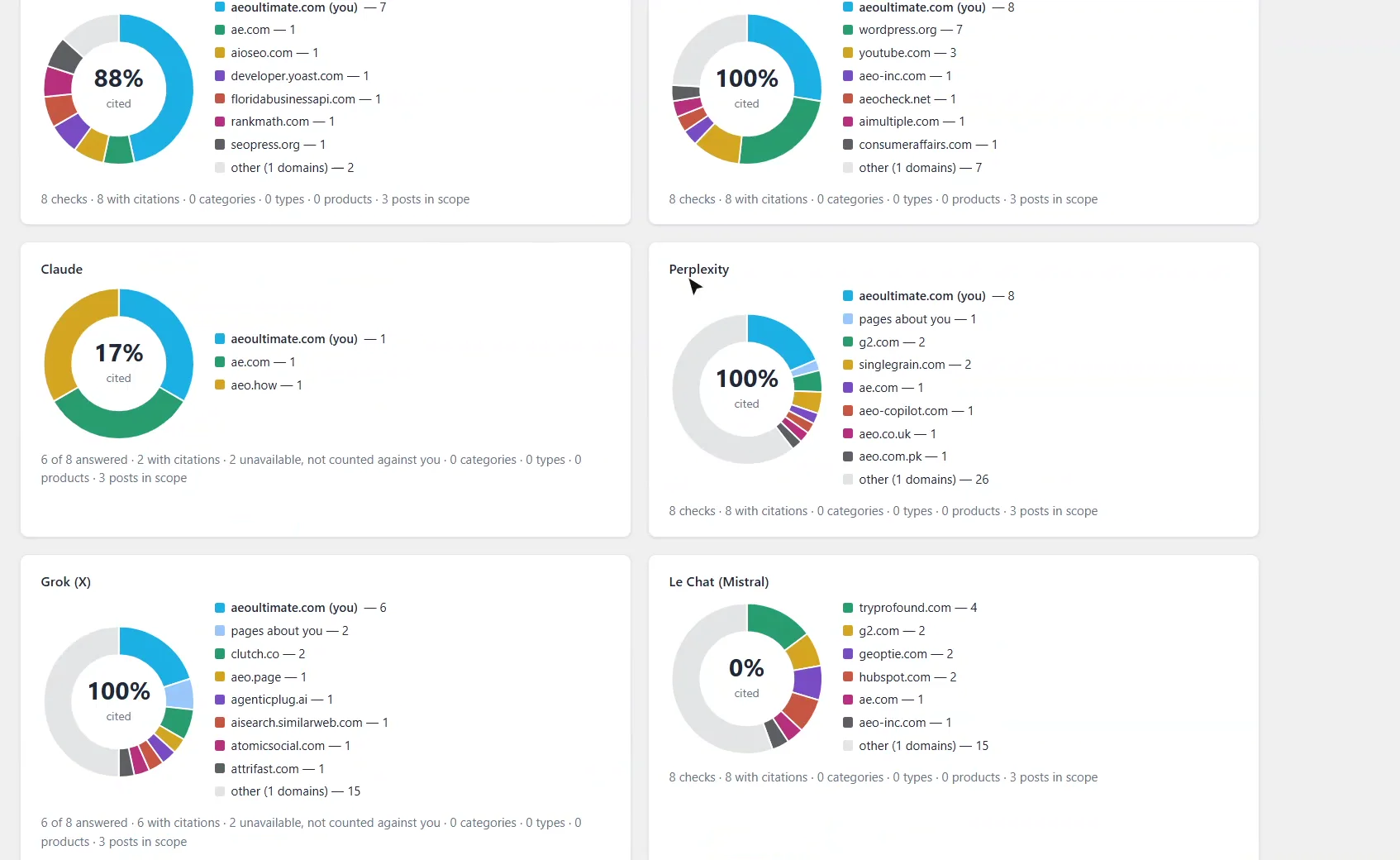
Who gets cited instead shows every site each engine cited, as a share of voice. Your slice is blue. Pages other sites wrote about you, like reviews, listings and comparisons, get their own slice, so they're never counted as competitors.
2:24 Every question, every engine
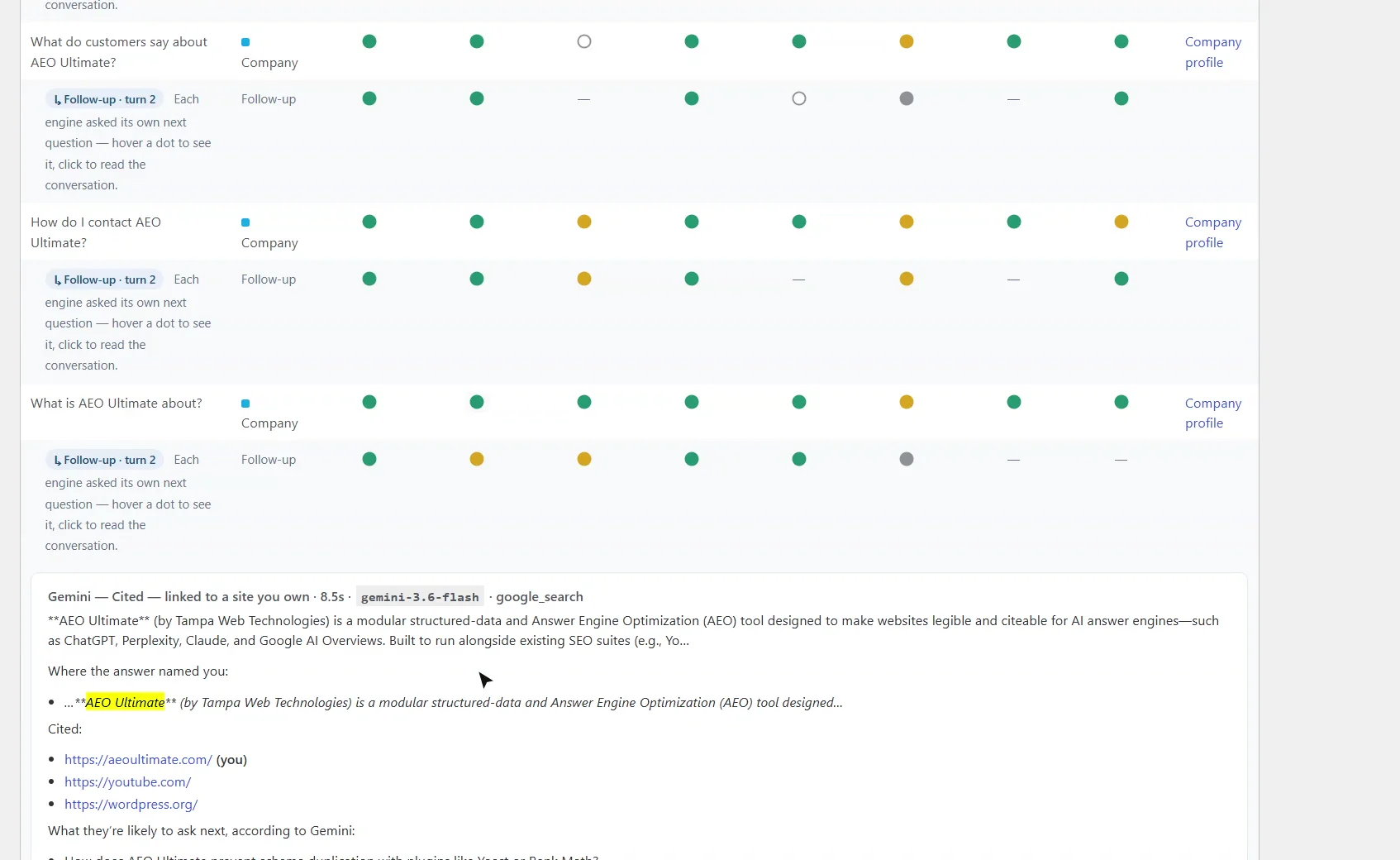
Every question, every engine is the full grid. Green means cited, gold means named, grey means absent, and an empty circle means the engine couldn't answer. Click any dot to read exactly what that engine said, who it cited, and where it named you.
2:41 What to fix, and citations versus visits
The last column links straight to what to fix, like your company profile or FAQ content. And at the bottom, Cited here, visited from there puts each engine's citation rate next to the visitors it actually sent, so you can see which assistants turn citations into traffic.
3:00 Wrap-up
Run it regularly with the same persona and location, and the trend lines show whether your changes are working. Thanks for watching.
What does AI Visibility measure?
For every question and every engine, one of four results: cited (the answer linked to something you own), named (it mentioned you without a link), absent (neither), or unavailable (the engine couldn’t be asked, which is never counted against you). Where your site already states the answer, such as your policies or prices, it also flags answers that contradict what you publish. Find it under TWT AEO → AI Visibility.
What these checks are, and are not
Each check calls the assistant’s API with web search turned on. The consumer apps personalise their answers and change daily, so this is the closest reproducible measure, not a copy of what one person sees.
Which AI engines does it check, and who pays?
Eight engines: ChatGPT, Gemini, Claude, Perplexity, Grok, Le Chat (Mistral), DeepSeek and Muse (Meta AI). Every check is one model call with one web search on your own API key, so your AI provider bills you directly at its rate. The page shows the number of checks a run will make before anything is spent, and nothing runs until you press Start run. A run pauses at your daily cap rather than failing.
How does it know which links are mine?
What counts as you holds the domains and profiles that belong to you. Your own domain always counts, and the social profiles on your Company profile are added automatically. Add other sites you own, one per line, and set up each brand with the phrases to watch for and the sites and profiles it owns. A citation of your LinkedIn page counts as a citation, and the results show where each one landed.
What are buyer personas, locations and follow-ups for?
AI assistants tailor answers to the person asking and where they are. Who is asking lets you run the same questions as one of your buyers, such as an SEO professional or a WordPress site owner. Search from sets the location, by default your Local Pack address. Follow the conversation asks each engine its own predicted next question and records whether you’re cited at that step too. Use one persona and one location per run so runs compare like with like.
Which questions does it ask?
Allocation sets how many questions to ask at each level: your company, each brand, categories, product types, products and posts. Questions are built from templates using what your site already holds, so runs stay comparable from week to week. Review the list before running: untick anything you don’t want asked, reword a question, or add your own.
How do I read the results?
The top of Results shows the share of answered checks that cited you, the share that named you (citations included), and how many answers got a fact wrong. Below that, each engine gets its own cited and named score.
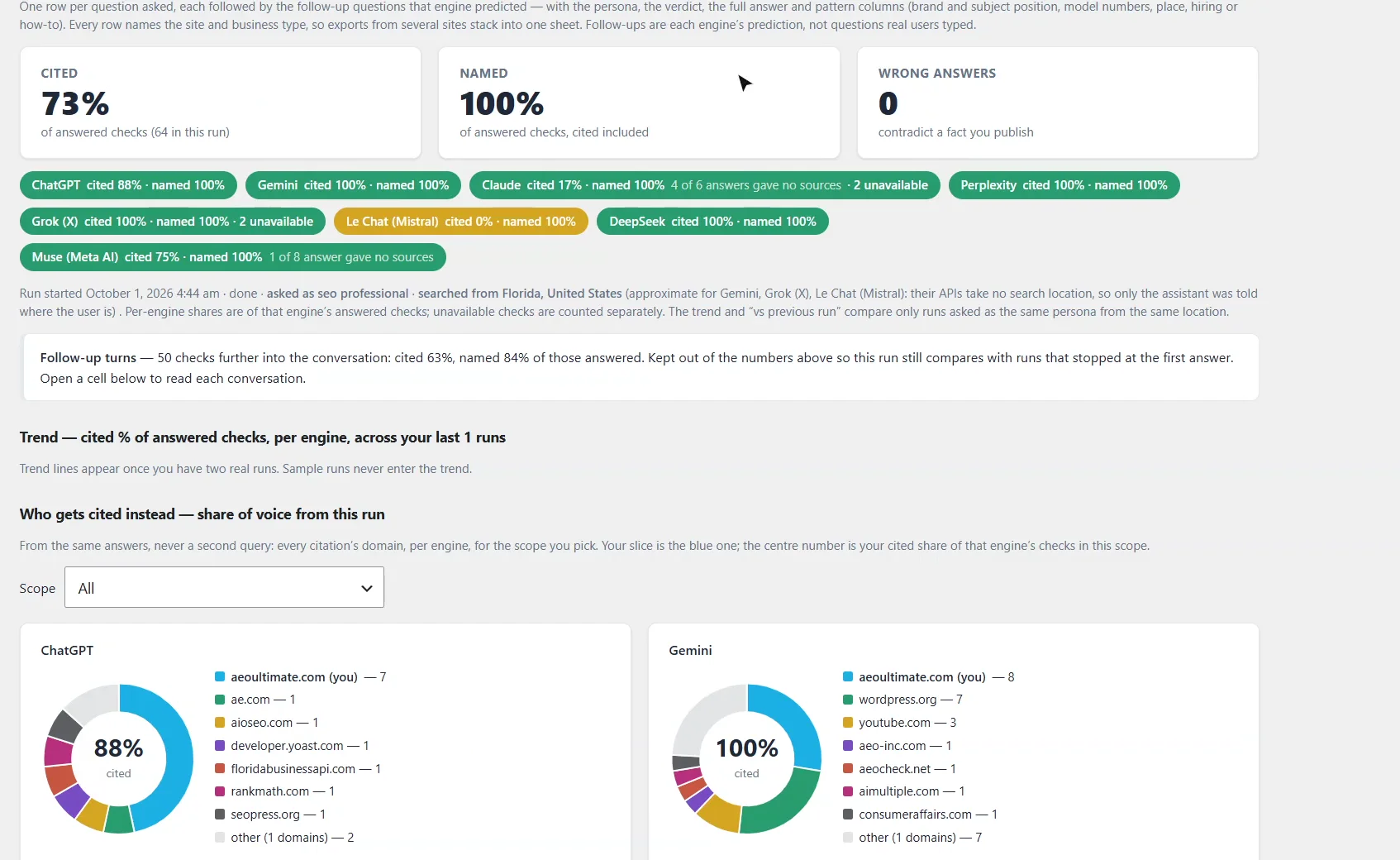
Who gets cited instead shows every site each engine cited as a share of voice, with your slice in blue. Pages other sites wrote about you, like reviews, listings and comparisons, get their own slice, so they’re never counted as competitors.
Every question, every engine is the full grid: green for cited, gold for named, grey for absent, and an empty circle for unavailable. Click any dot to read the engine’s answer, where it named you and the links it cited. The last column links to what to fix, such as your company profile or FAQ content.
Do citations turn into visitors?
AI referrals at the top of the page shows the assistants that sent visitors in the last 28 days, from Google Analytics, next to your top Search Console and Bing queries. At the bottom, Cited here, visited from there puts each engine’s citation rate next to the sessions it sent. The two aren’t cause and effect: sessions from an assistant that never cites you usually mean people are asking things your question set doesn’t cover yet.
Run it on a schedule
Trend lines appear once you have two runs asked as the same persona from the same location. Run regularly after changes to your content or schema to see whether they’re working. The last 12 runs are kept, and each can be exported as CSV.
Something not adding up? See Troubleshooting or ask in the support forum.
Still stuck?
Message me directly — free tier included. Most replies land within the hour during Tampa working hours. Get support →