Docs / for WordPress / Command Center: Google Analytics, Search Console and Bing in WordPress
AEO Ultimate for WordPress
Command Center: your search data, AI-ready
Command Center puts Google Analytics, Google Search Console and Bing Webmaster Tools in one place inside WordPress, next to the checks that decide whether AI can read your site: crawler access, page speed, index status and which AI bots actually visit. Watch the walkthrough, or read the guide below.
Read the transcript
0:00 Google Analytics, Search Console and Bing in WordPress
Command Center puts Google Analytics, Google Search Console and Bing Webmaster Tools in one place inside WordPress, next to the checks that decide whether AI can read your site: crawler access, page speed, index status and AI Crawler Watch. One Google sign-in connects Analytics and Search Console; Bing takes an API key.
0:26 Analytics: your top pages, and visits from AI assistants
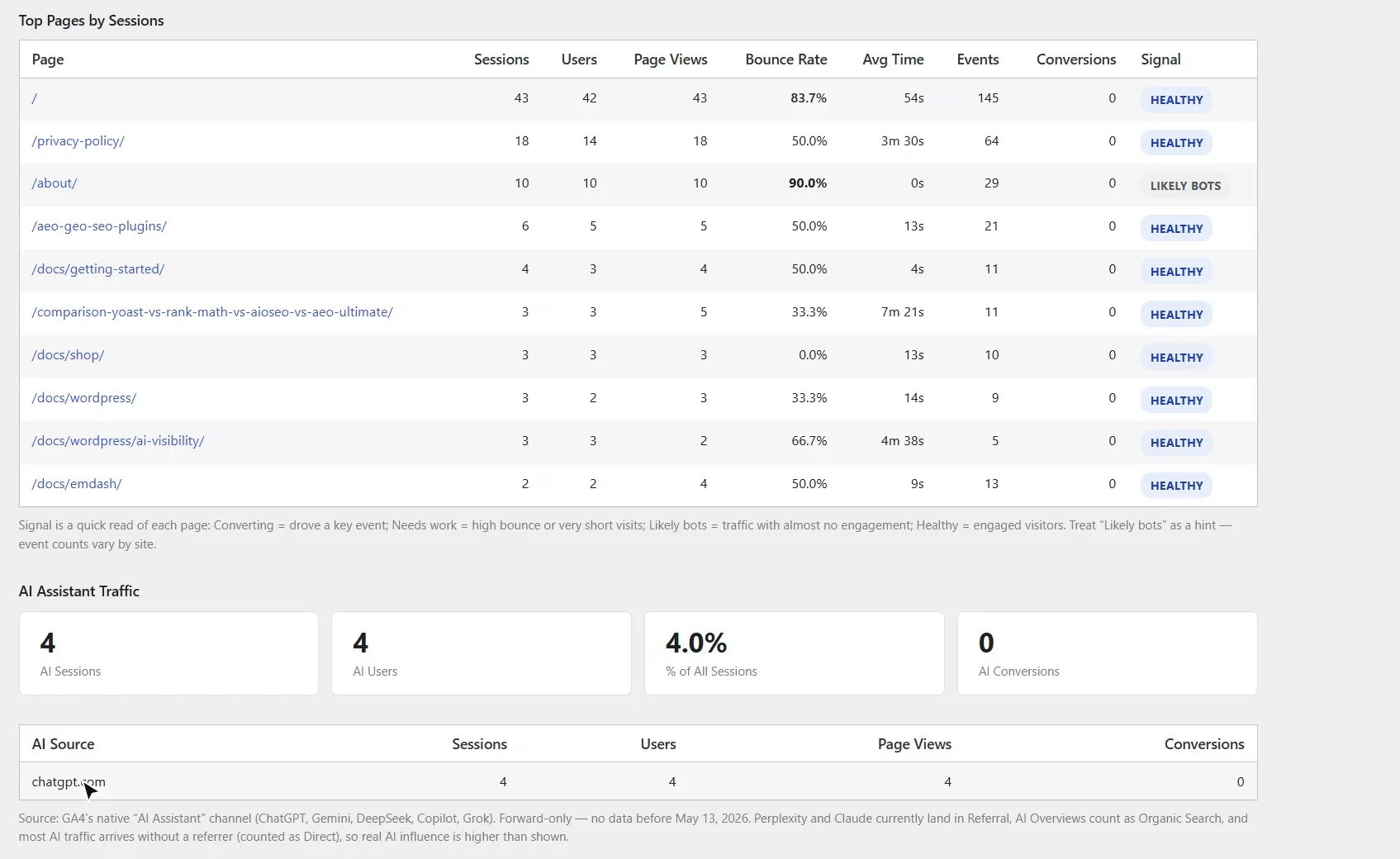
The Analytics tab lists your top pages, each with a signal: healthy, converting, needs work, or likely bots. Below that, AI Assistant Traffic counts the visits that came from ChatGPT, Gemini and the other assistants: proof that being cited sends people to your site.
0:49 Search Console: queries and URL Inspection
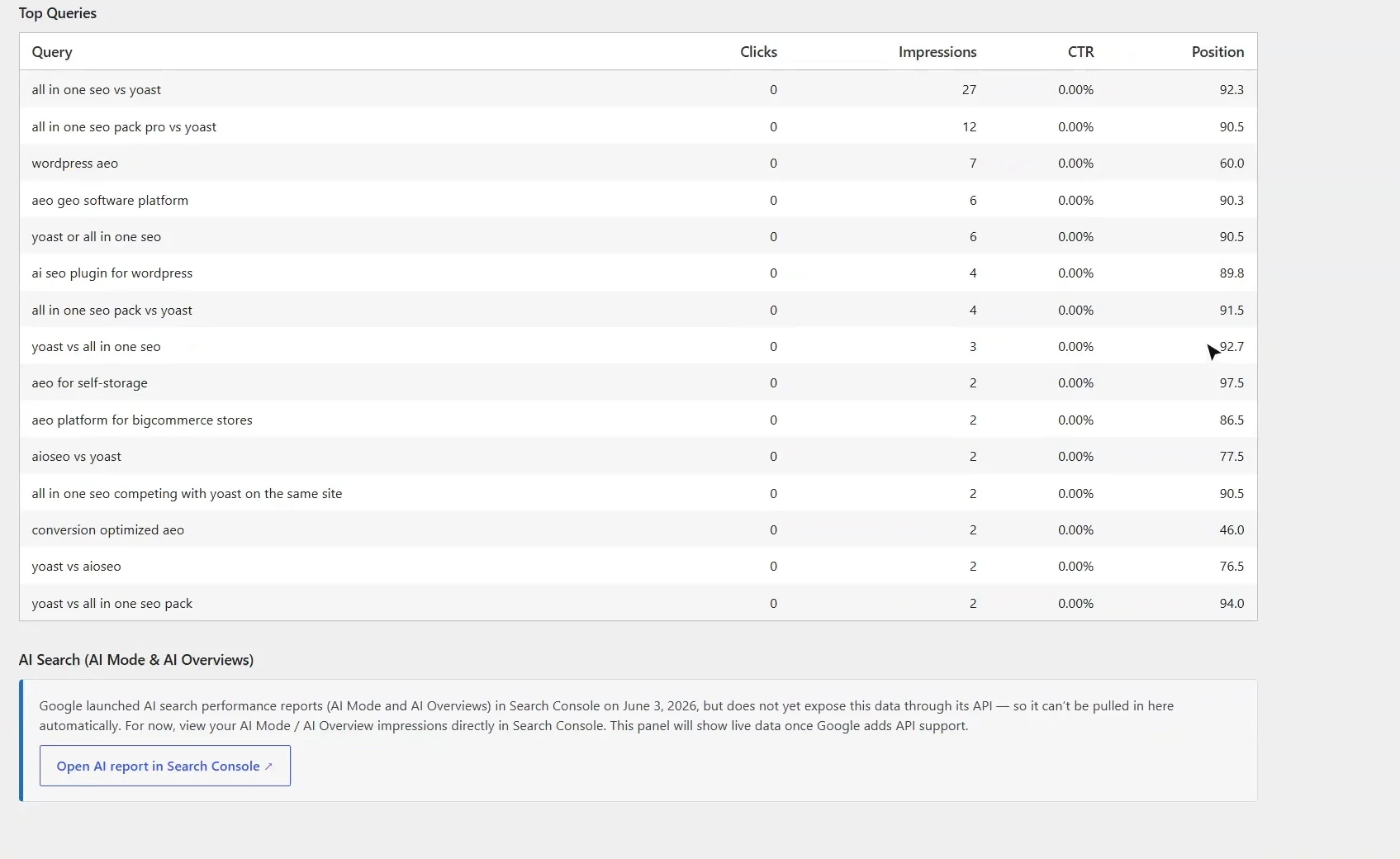
Search Console shows clicks, impressions and position, and the searches you appear for, busiest first. URL Inspection checks any address live: whether Google has indexed it, the canonical Google chose, and rich-result eligibility. Google's new AI Mode report isn't in its API yet, so there's a link straight to it.
1:14 Bing Webmaster Tools, and crawl issues
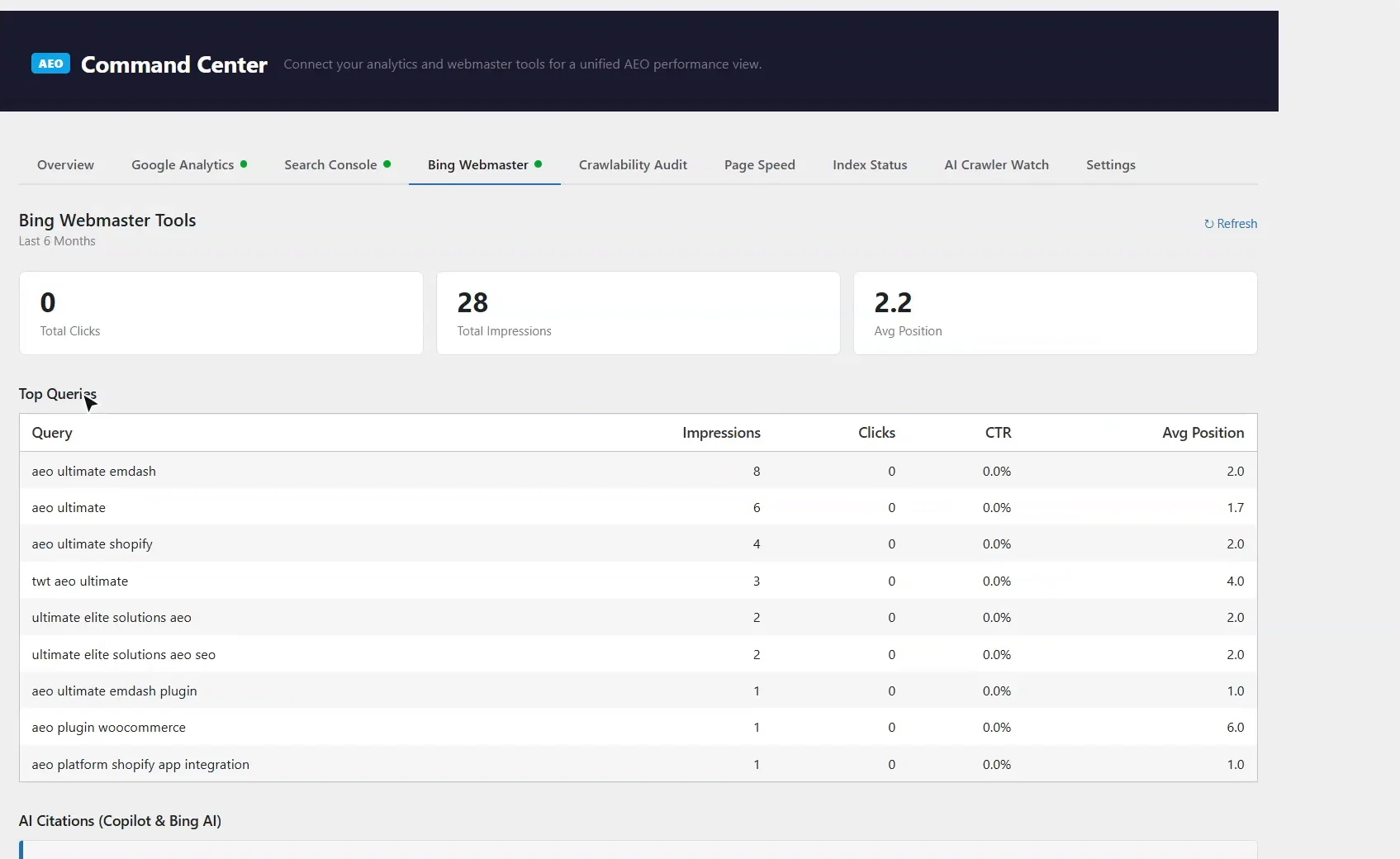
Bing matters for AI too: its index feeds Copilot. The Bing tab shows your searches over six months, and the crawl issues Bing reports: errors, blocked pages and redirects, each with its fix. Here there are none.
1:33 Crawlability Audit: can AI crawlers get in?
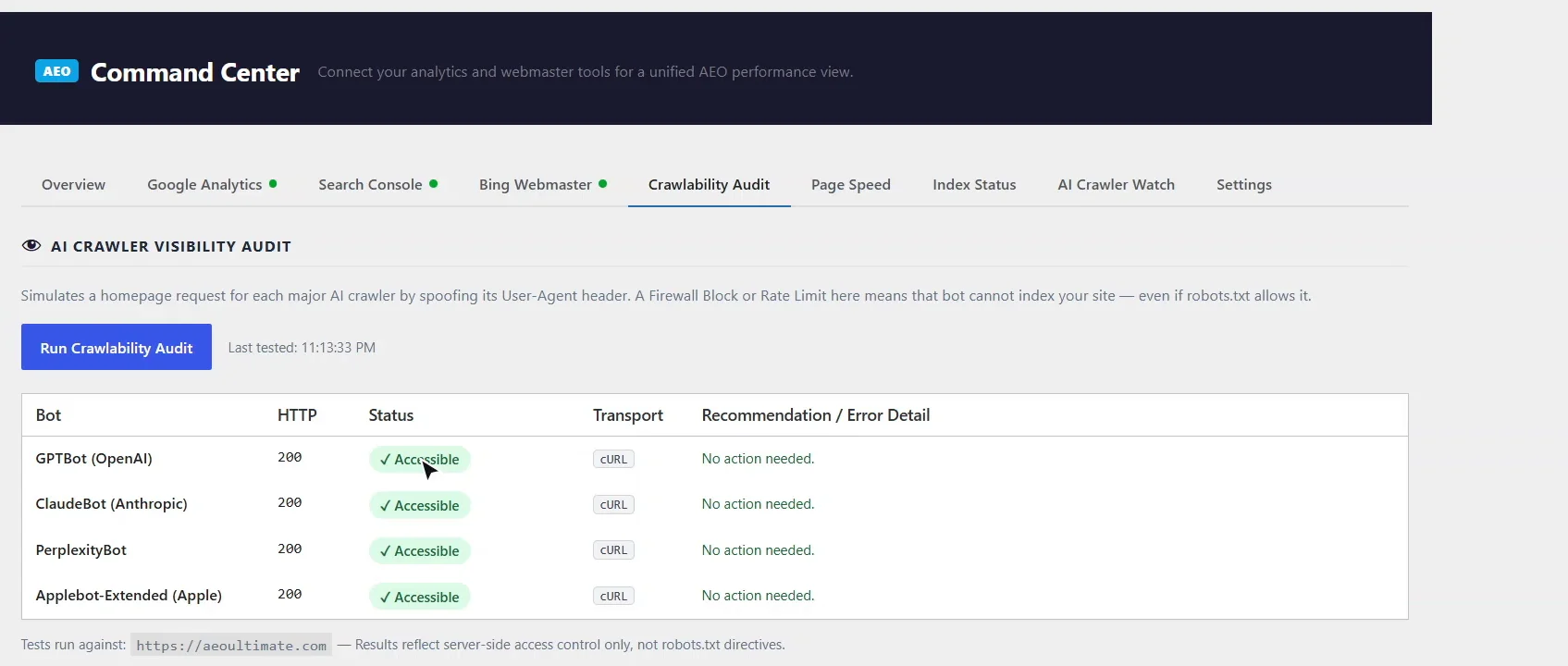
The Crawlability Audit requests your home page as GPTBot, ClaudeBot, PerplexityBot and Apple's crawler. A firewall, security plugin or CDN rule can block them even when robots. txt allows them. Here, every one gets through.
1:53 Page speed and traffic leaks
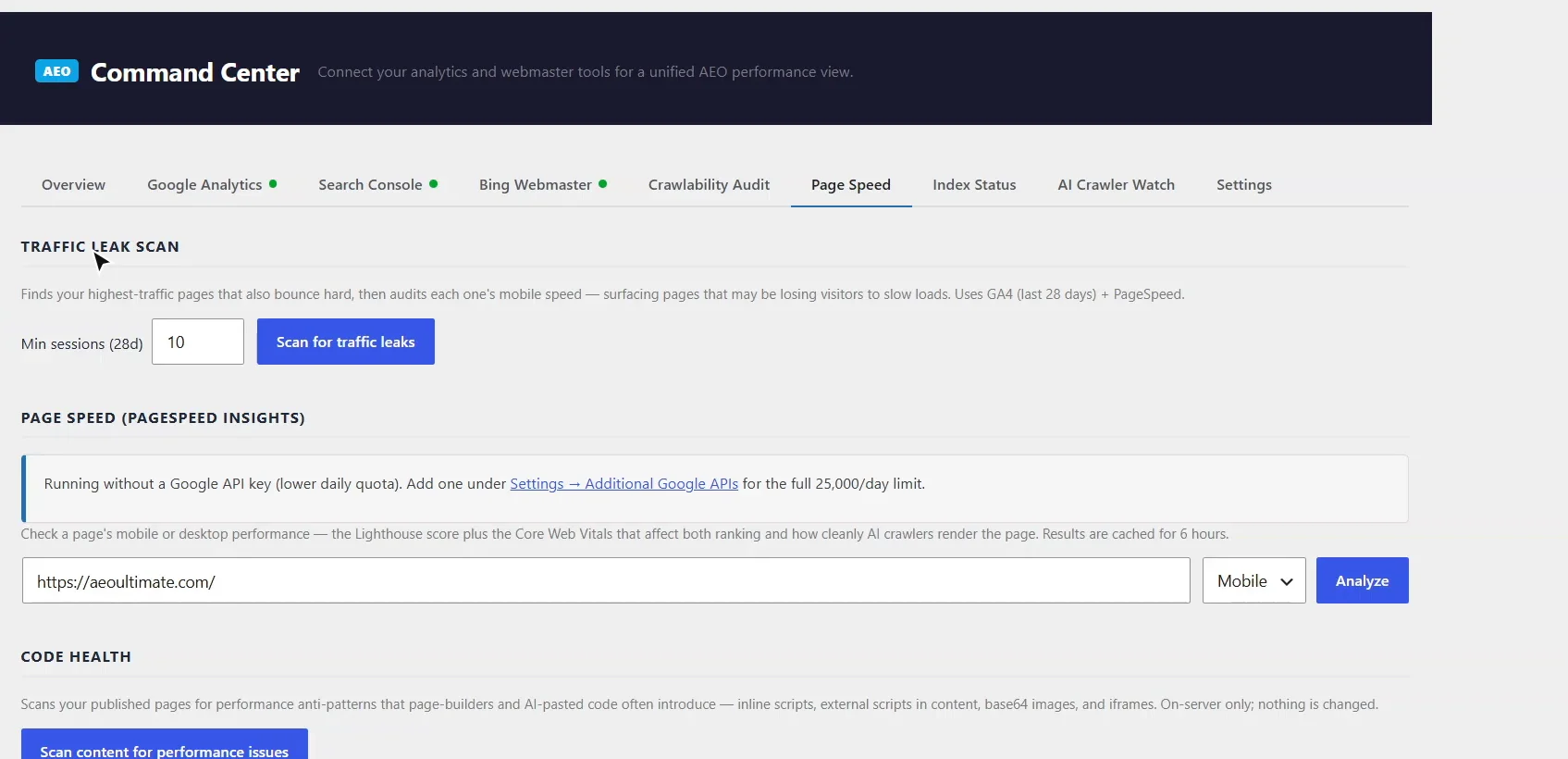
Page Speed runs Google's PageSpeed test for the Lighthouse score and Core Web Vitals. The traffic leak scan finds your busiest pages that also bounce hard on slow mobile loads, so you fix the ones that cost you the most visitors first. Code Health flags scripts, iframes and embedded images that page builders leave in content.
2:17 Index Status: pages Google has not indexed
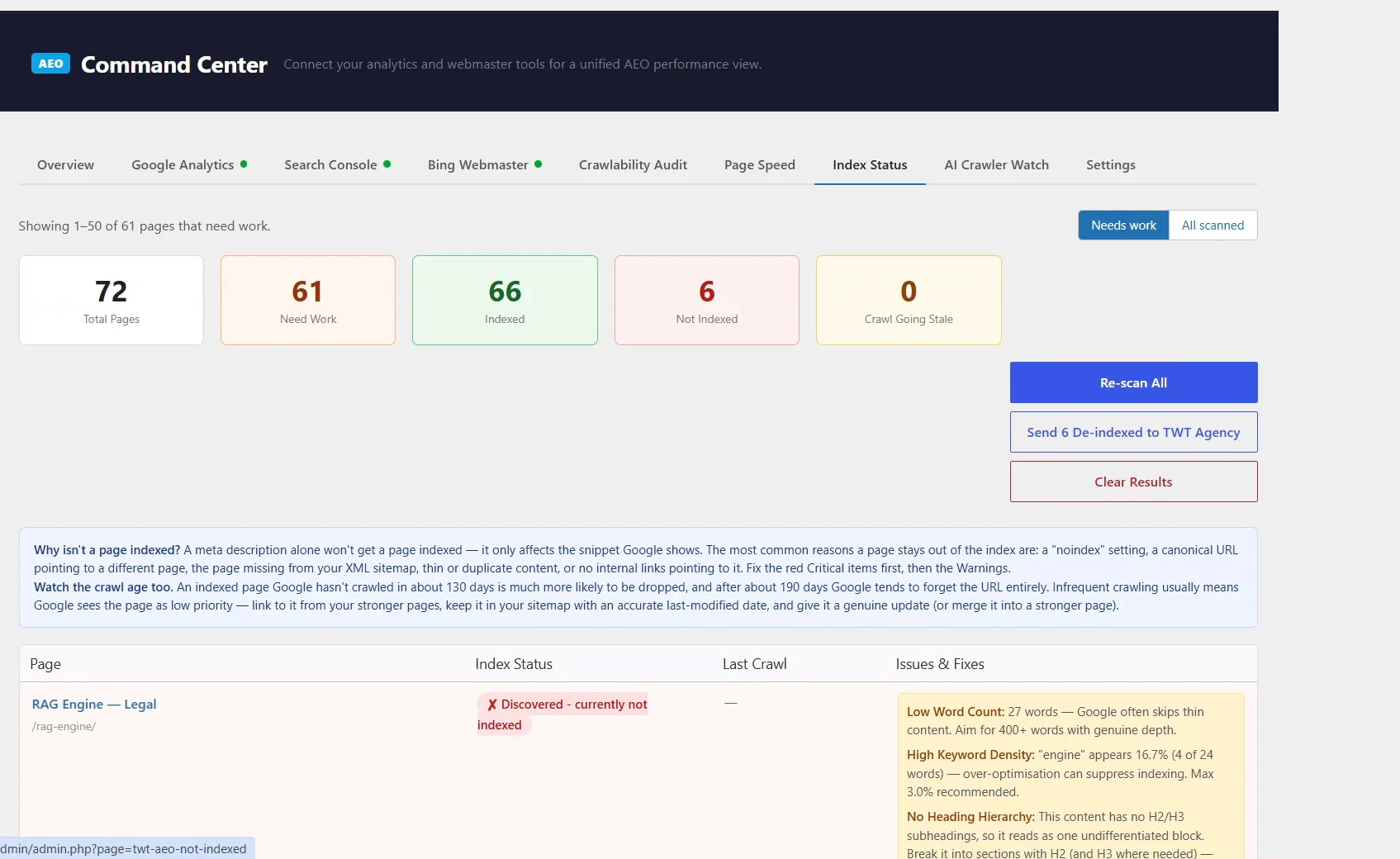
Index Status checks every published page with Search Console's URL Inspection. For each page Google hasn't indexed, it gives Google's own reason, like URL is unknown to Google, and what it found on the page: too few words, no headings, missing share tags. It also warns when Google hasn't crawled a page in months.
2:43 AI Crawler Watch: which AI bots read your site
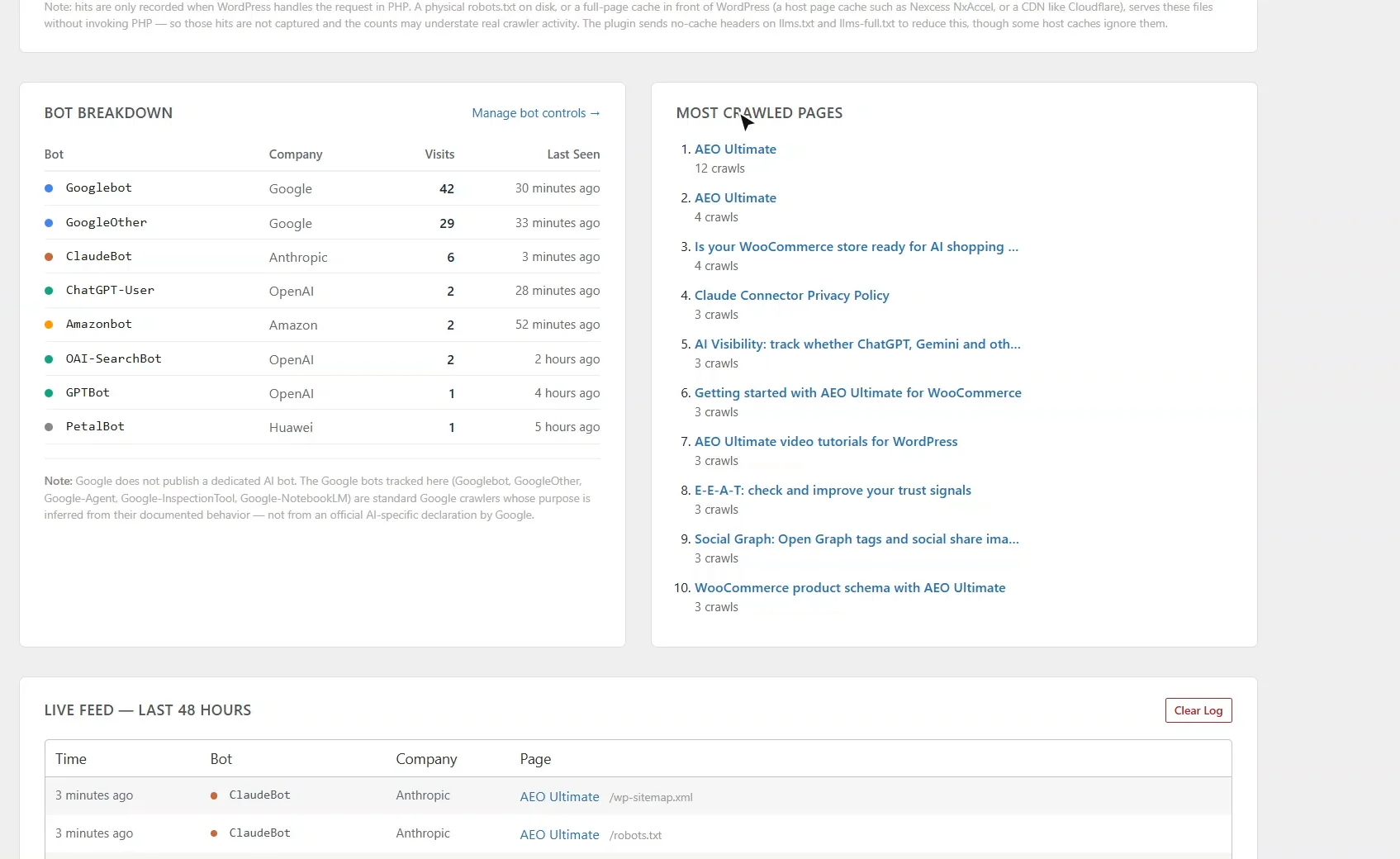
AI Crawler Watch logs every visit from AI crawlers and assistants: which bot, which company, and when. Discovery file hits show whether they fetch your robots. txt and llms. txt, and Most Crawled Pages shows what they read most.
3:02 Read-only, and cached
Command Center only reads your data, and caches it for an hour so the screens stay quick; Refresh fetches it again. Thanks for watching.
How do I connect Google Analytics, Search Console and Bing to WordPress?
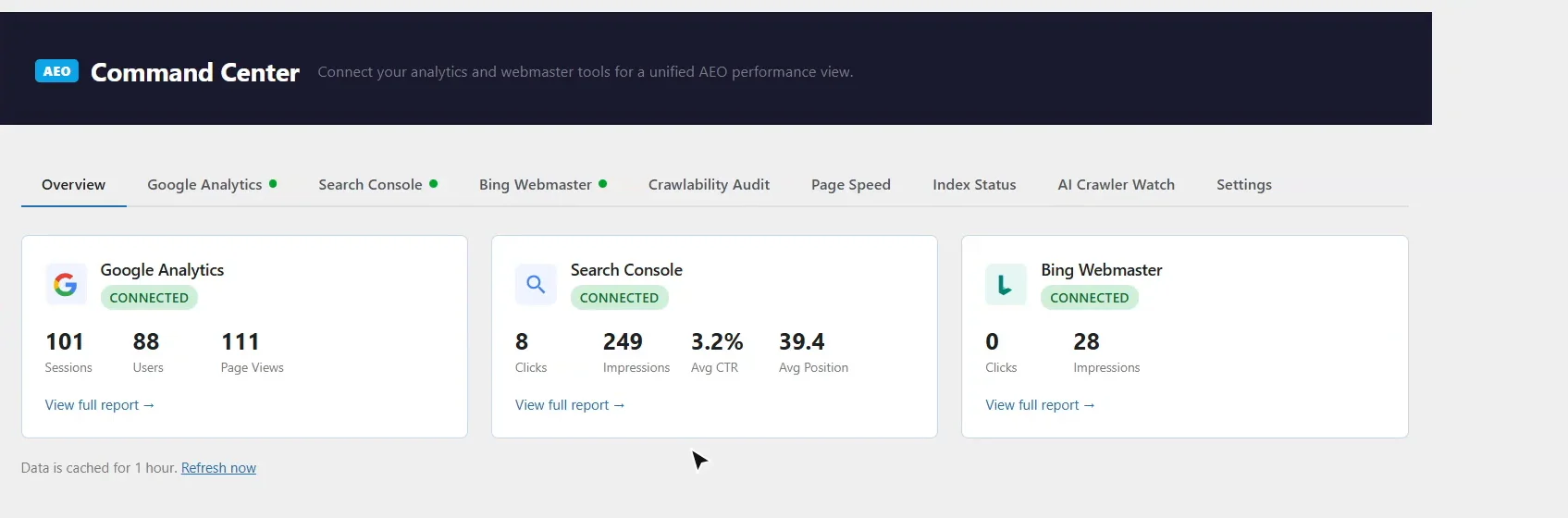
Open TWT AEO → Command Center → Settings. One Google sign-in connects both Google Analytics 4 and Google Search Console; choose the property for each. Bing Webmaster Tools connects with an API key from your Bing Webmaster account. The Overview then shows sessions, users and page views, clicks, impressions, click-through rate and position side by side. Data is cached for an hour; Refresh now fetches it again.
How many visits come from ChatGPT and other AI assistants?
The Google Analytics tab lists your top pages, each with a signal: Healthy, Converting, Needs work or Likely bots. Below it, AI Assistant Traffic uses Google Analytics’ own AI Assistant channel to count the sessions that came from ChatGPT, Gemini, DeepSeek, Copilot and Grok, with conversions. Perplexity and Claude visits currently arrive as ordinary referrals, so the real number can be higher.
What does the Search Console tab show?
Clicks, impressions, click-through rate and average position, and the searches you appear for, ordered by clicks and then impressions. URL Inspection checks any address live: whether Google has indexed it, the canonical Google chose, and whether it is eligible for rich results. Google’s AI Mode and AI Overviews report is not in its API yet, so the tab links straight to it in Search Console.
Why does Bing matter for AI search?
Bing’s index feeds Microsoft Copilot and other AI answers. The Bing Webmaster tab shows six months of clicks, impressions and the searches you appear for, and lists the crawl issues Bing reports on your pages — errors, pages blocked by robots.txt and redirects — each with its fix. With none, it says so. The same tab manages IndexNow, which tells Bing and other engines the moment you publish.
Can AI crawlers reach my site?
The Crawlability Audit requests your home page as GPTBot, ClaudeBot, PerplexityBot and Applebot-Extended and reports what each one got back. A firewall, security plugin or CDN rule can block them even when robots.txt allows them; when a bot is refused, the audit tries again as an ordinary browser to show whether the block targets AI crawlers, and says what to change. Its own test requests are never counted as crawler visits.
How do I check page speed and Core Web Vitals?
Page Speed runs Google PageSpeed Insights on any page, mobile or desktop, for the Lighthouse score and Core Web Vitals, cached for six hours. The traffic leak scan finds your busiest pages that also bounce hard and audits their mobile speed, so you fix the slow pages that cost you the most visitors first. Code Health flags inline scripts, external scripts, embedded base64 images and iframes left in content by page builders and pasted code.
Why isn’t my page indexed by Google?
Index Status checks every published page with Search Console’s URL Inspection. For each page Google has not indexed, it shows Google’s own reason — such as “URL is unknown to Google” or “Discovered – currently not indexed” — and what it found on the page: too few words, a keyword used too often, no heading structure, or missing share tags. It also warns when Google has not crawled an indexed page for months, before Google drops it. For the full picture, see the troubleshooting guide.
Which AI bots are reading my site?
AI Crawler Watch logs every visit from AI crawlers and assistants — which bot, which company, which page and when — with a live feed of the last 48 hours. AI Discovery File Hits shows whether they fetch your robots.txt and llms.txt, and Most Crawled Pages shows what they read most. Visits are recorded when WordPress handles the request; a full-page cache or CDN in front of the site can serve some requests without WordPress seeing them.
Does Command Center change my site?
No. It only reads your Analytics, Search Console and Bing data and checks your pages. Fixes are links to the page editor, or to the AEO Ultimate screen that handles them.
Citations that send visitors
AI Visibility shows whether the engines cite you. AI Assistant Traffic and AI Crawler Watch show the other half: the assistants reading your pages, and the people who arrive from them.
Something not adding up? See Troubleshooting or ask in the support forum.
Still stuck?
Message me directly — free tier included. Most replies land within the hour during Tampa working hours. Get support →