Docs / for WordPress / Schema Detector: FAQ, Service and Contact schema for WordPress
AEO Ultimate for WordPress
Schema Detector: FAQ, Service and Contact schema
Schema Detector finds the content on your site that qualifies for structured data, such as questions and answers, services and contact details, checks whether the matching schema is there, and adds it in one click. Watch the walkthrough, or read the guide below.
Read the transcript
0:00 What Schema Detector does, and why schema matters for AEO
Schema Detector finds content on your site that qualifies for structured data — FAQs, services and contact details — and checks whether the matching schema is there. Schema tells search engines and AI assistants exactly what each part of a page is: a question and its answer, a service you offer, or how to reach you. That's what lets an answer engine lift your answer and credit you for it.
0:26 FAQ: pages with questions and answers
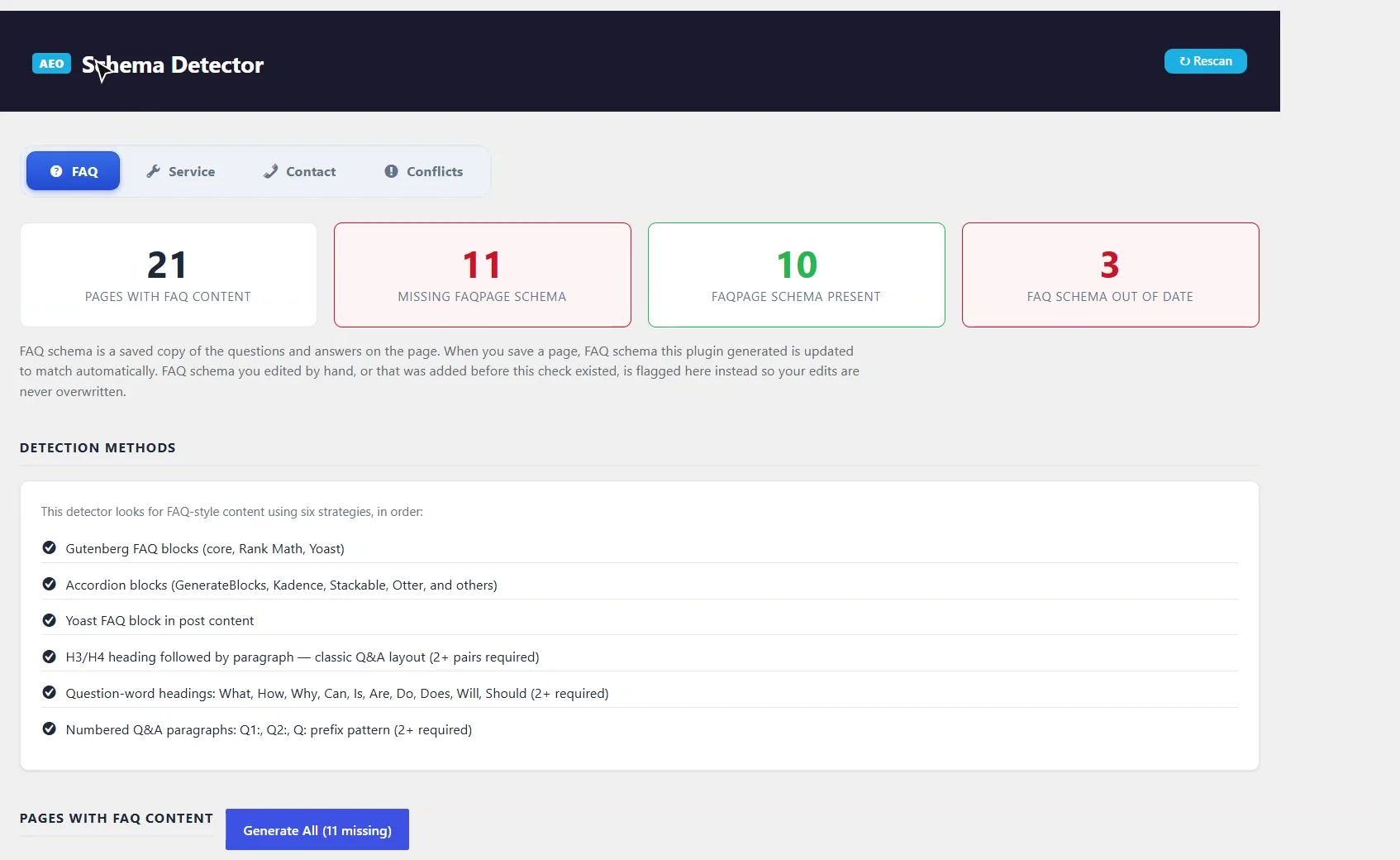
On the FAQ tab, twenty-one pages have question-and-answer content, and eleven of them are missing FAQPage schema. It finds questions and answers six ways, from FAQ and accordion blocks to question-style headings.
0:43 Adding FAQ schema in one click
Our Social Graph guide is missing its FAQ schema. Click Add FAQ Schema, and AEO Ultimate builds it from the questions already on the page. It's free, with no AI calls, and Generate All does every page at once.
0:59 FAQ section removed: schema without visible questions
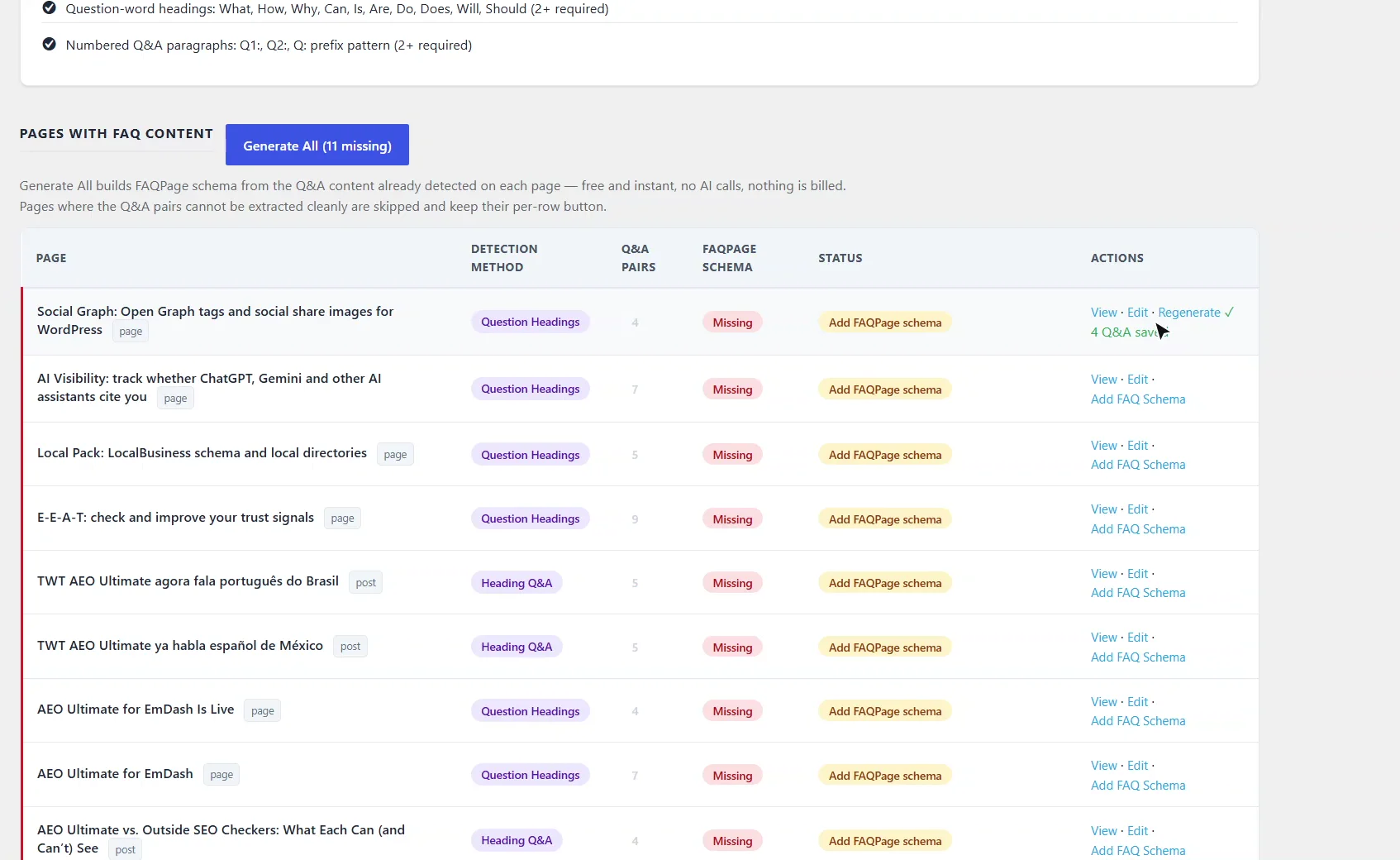
When a page no longer shows its questions but still carries FAQ schema, it's flagged FAQ section removed. Google requires FAQ content to be visible on the page, so either remove the schema or put the questions back.
1:23 Service schema
The Service tab does the same for service pages. Here, all six have Service schema, and you can edit or remove any of them.
1:38 Contact: Organization, address and contact point
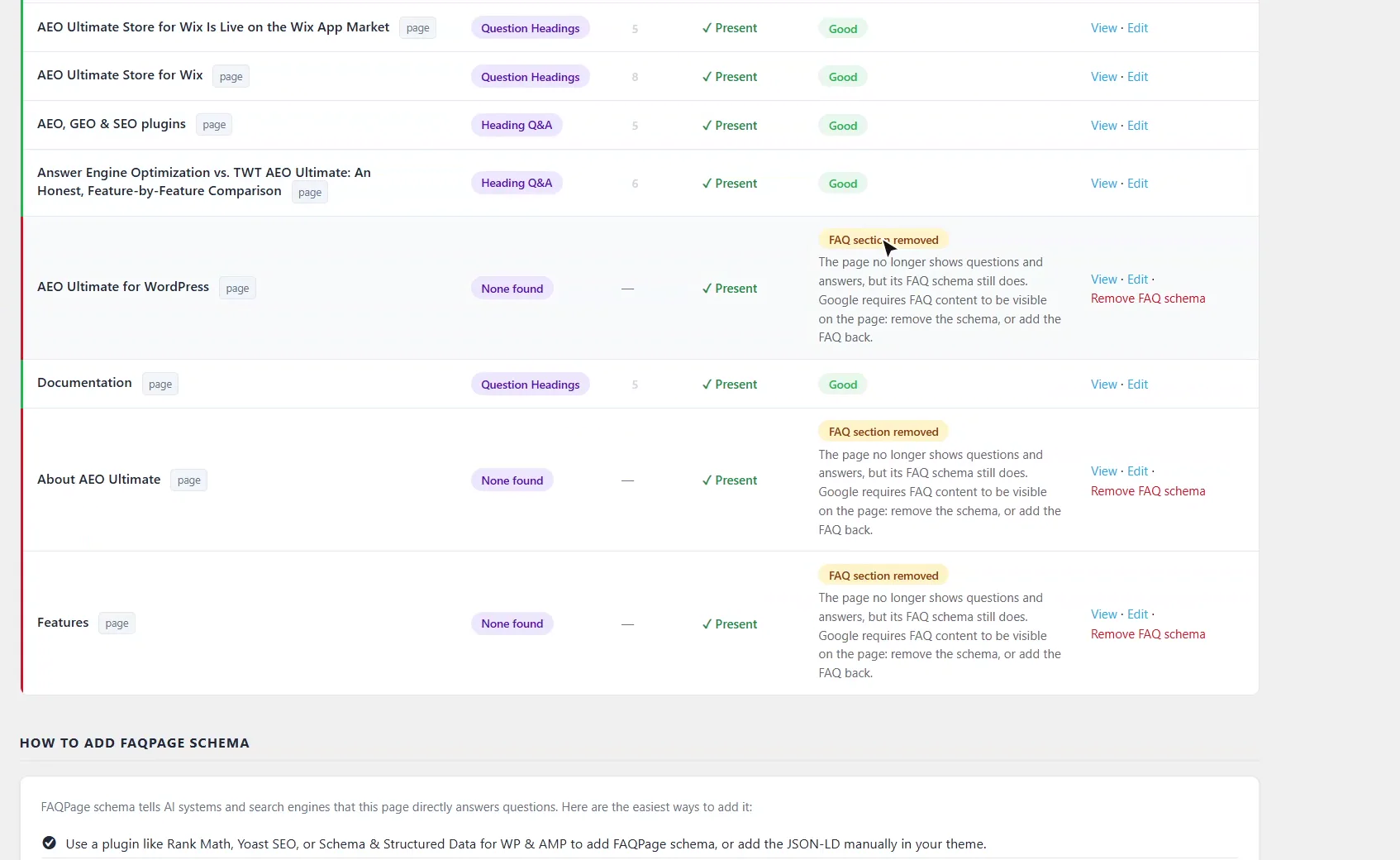
Contact checks your contact pages for Organization, address and contact point schema. Enter your business info once, and Create from this info adds complete schema to any contact page that needs it.
2:00 Conflicts with other SEO plugins
Conflicts watches for Yoast, Rank Math, All in One SEO and other schema plugins writing the same schema types, so you keep one version, and it can clear leftover schema data from an SEO plugin you've removed.
2:14 Wrap-up
Rescan after you edit your pages, and keep each schema type in one place, so search engines and AI assistants see one consistent answer. Thanks for watching.
Why does schema matter for AEO?
Structured data tells search engines and AI assistants exactly what each part of a page is: a question and its answer, a service you offer, or how to reach you. Answer engines quote passages rather than whole pages, and FAQPage schema marks which text is the question and which is the answer, so an engine can lift your answer and credit you for it.
How does it find FAQ content?
Open TWT AEO → Schema Detector. The FAQ tab looks for questions and answers six ways: FAQ blocks (core, Rank Math and Yoast), accordion blocks, the Yoast FAQ block, H3/H4 headings followed by a paragraph, question-word headings (What, How, Why, Can…), and numbered Q&A paragraphs. The cards at the top show how many pages have FAQ content, how many are missing FAQPage schema, and how many have schema that no longer matches the page.
How do I add FAQ schema?
Click Add FAQ Schema on a page’s row, and AEO Ultimate builds FAQPage schema from the questions already on the page. Generate All does every page that’s missing it at once. Both are free and instant: no AI calls, nothing billed. Pages where the questions and answers can’t be extracted cleanly are skipped and keep their own button. When you edit a page later, schema the plugin generated is updated to match automatically; schema you edited by hand is flagged instead, so your edits are never overwritten.
What does “FAQ section removed” mean?
The page still carries FAQ schema, but it no longer shows the questions and answers. Google requires FAQ content to be visible on the page, so either click Remove FAQ schema or put the FAQ back on the page.
What do the Service and Contact tabs check?
Service finds service pages by page type, URL, content keywords and WooCommerce products, and checks for Service schema. Generate All fills it from each page’s title and content plus your business info, and you can edit or remove any page’s schema afterwards.
Contact checks your contact pages for Organization or LocalBusiness schema, a PostalAddress, a ContactPoint (phone or email), and a single, consolidated Organization entity. Enter your business info once, and Create from this info adds complete schema to any contact page that needs it, free and instantly.
What if another SEO plugin writes schema too?
The Conflicts tab detects when Yoast SEO, Rank Math, All in One SEO, or Schema & Structured Data for WP & AMP outputs the same schema types as AEO Ultimate, so you can keep one version. If you’ve removed one of those plugins, it can also clear the schema data it left in your database.
One version of each schema type
Two plugins writing the same FAQPage or Organization schema can disagree, and search engines and AI assistants then have to guess which to trust. Rescan after you edit pages, and keep each schema type in one place.
Something not adding up? See Troubleshooting or ask in the support forum.
Still stuck?
Message me directly — free tier included. Most replies land within the hour during Tampa working hours. Get support →