Docs / for WordPress / E-E-A-T: check and improve your trust signals
AEO Ultimate for WordPress
Check and improve your E-E-A-T
The E-E-A-T page checks your site for the signals that show who is behind your content, scores them out of 100, and gives you a button or a direct fix for most of what’s missing. Watch the three-minute walkthrough, or read the guide below.
Read the transcript
0:00 What E-E-A-T is
E-E-A-T stands for Experience, Expertise, Authoritativeness, and Trustworthiness. It's how Google's quality guidelines judge whether content comes from a credible source — and AI answer engines look for the same signals before they quote you. AEO Ultimate checks your site for these signals and shows you exactly what's missing.
0:23 Your E-E-A-T score and grade
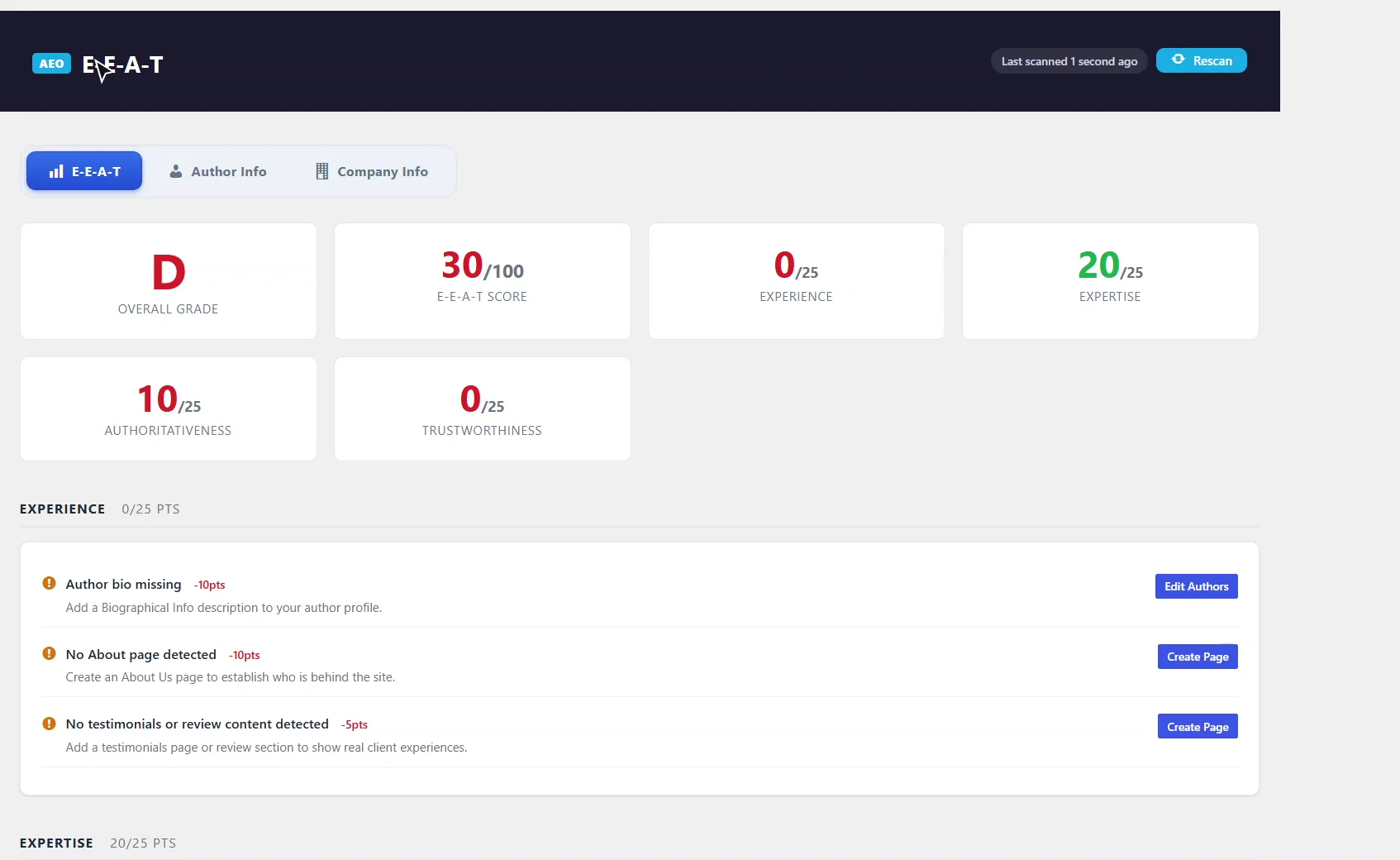
At the top you get an overall grade and a score out of one hundred. Each of the four pillars is worth twenty-five points. This demo site is sitting at thirty — a D — so let's fix that.
0:38 Experience: author bio, About page, testimonials
Experience is about showing real people with real, first-hand knowledge. Here we're missing an author bio, an About page, and testimonials. See this Create Page button? Click it, and AEO Ultimate creates a draft About page and opens it in the editor, ready for you to fill in. It counts once you publish it.
0:59 Expertise: schema and topic clusters
Expertise is in better shape. Our schema already names the author and organization, and posts carry published and modified dates. The one gap is topic clusters — grouping related posts around a main hub page.
1:14 Authoritativeness: sameAs links
Authoritativeness is about whether the rest of the web recognizes you. The big one here is sameAs links. Click Add Links, and enter your LinkedIn, Facebook, YouTube, and Google Business profiles. These tell search engines and AI that those profiles belong to you. You can even check whether Google's Knowledge Graph already recognizes your brand.
1:45 Trustworthiness: privacy, contact, HTTPS
Trustworthiness covers the basics: a privacy policy, a contact page, and HTTPS. These are quick wins. The Create Page buttons give you a draft to start from.
1:57 Author metadata and completeness
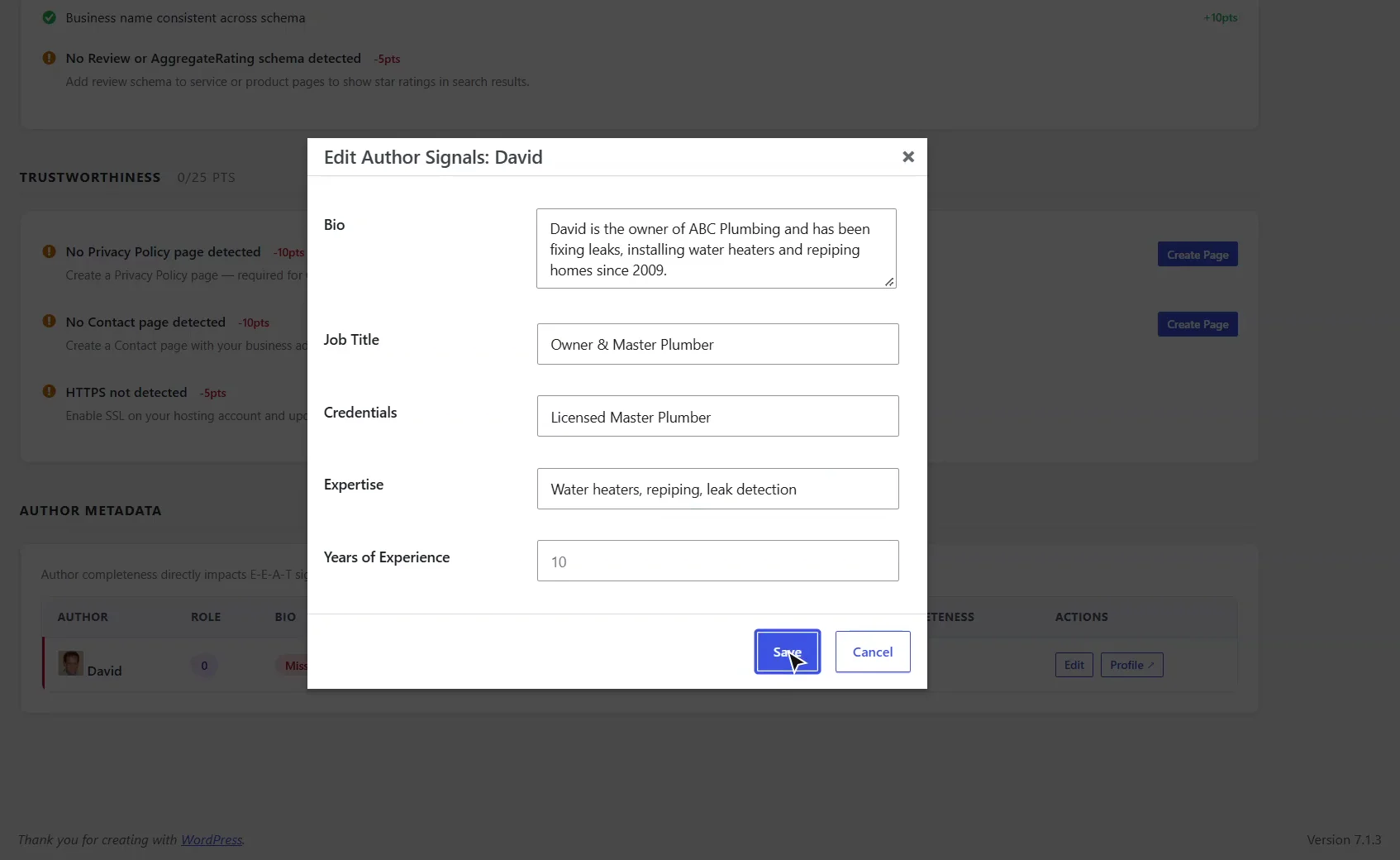
Further down, every author on your site gets a completeness score. Click Edit to add a bio, job title, credentials, and areas of expertise. This feeds straight into your author schema.
2:23 Author Info and Company Info tabs
The Author Info and Company Info tabs let you fill in your full profile in one place: business name, description, founding year, and social profiles.
2:37 Rescan and see the score climb
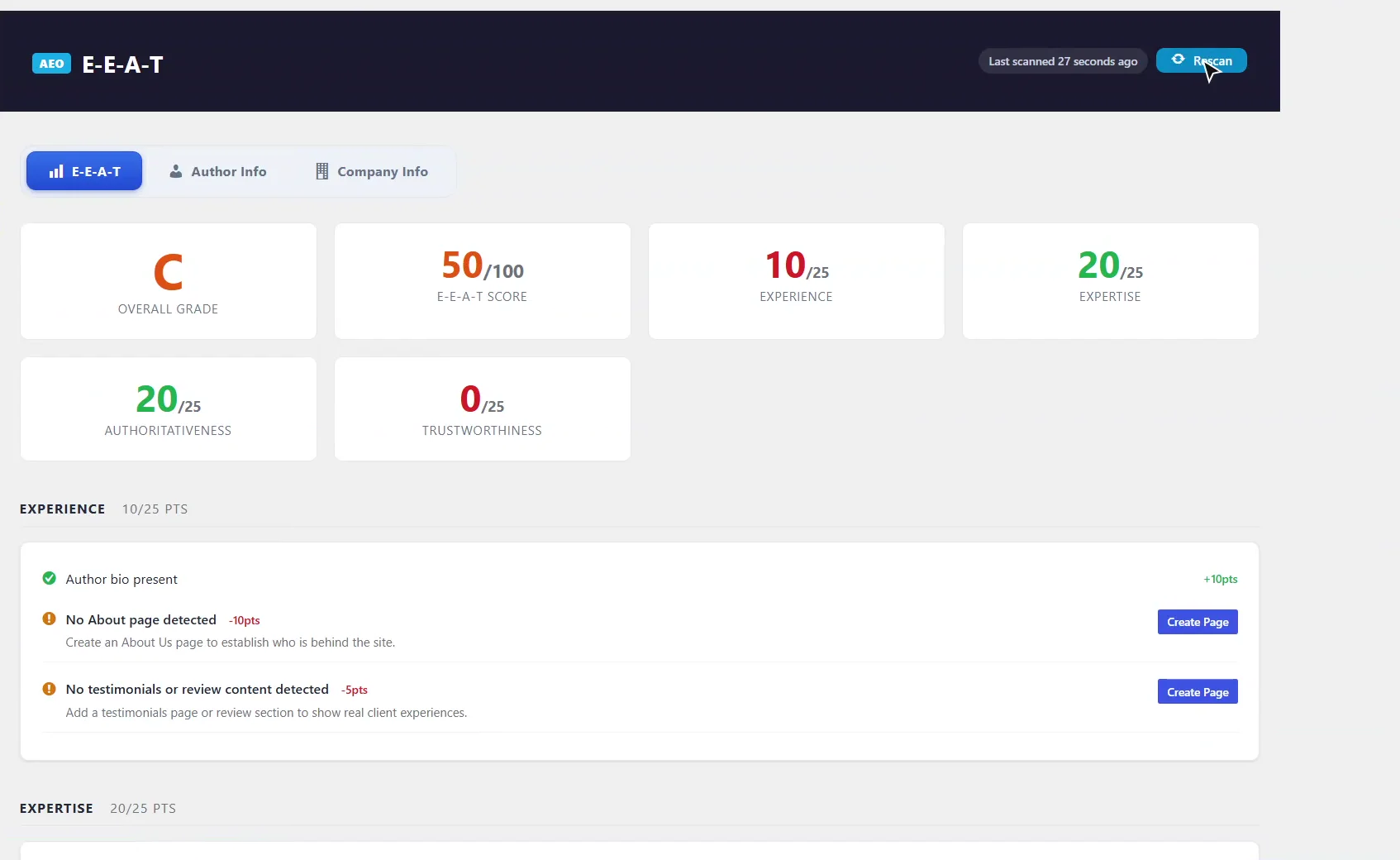
Once you've made your changes, hit Rescan. And there it is — our score climbs. E-E-A-T isn't a one-time fix, so check back whenever you add authors or pages. Thanks for watching.
What is E-E-A-T?
E-E-A-T stands for Experience, Expertise, Authoritativeness and Trustworthiness. It comes from Google’s search quality guidelines, which describe how to judge whether content comes from a credible source. AI answer engines such as ChatGPT, Perplexity and Google’s AI Overviews look for the same kinds of signals before they quote or cite a page: a named author with real credentials, a business that other websites recognize, and the basic pages that show a real organization runs the site.
Where do I find it?
In WordPress, go to TWT AEO → E-E-A-T. The page has three tabs: E-E-A-T (the scorecard), Author Info and Company Info.
How is the score calculated?
Each of the four pillars is worth 25 points, for a total of 100. The overall grade is A at 80 or more, B at 60–79, C at 40–59 and D below 40. Under each pillar you’ll see the signals the plugin found, with the points they earned, and the ones it didn’t, with the points they would add and how to fix them.
| Pillar | What it checks |
|---|---|
| Experience | An author bio, an About page, and testimonials or review content |
| Expertise | Author and Organization schema with a name, published and modified dates on posts, and a hub or topic-cluster structure |
| Authoritativeness | sameAs links to your business profiles, a business name that matches across your schema, and Review or AggregateRating schema |
| Trustworthiness | A Privacy Policy page, a Contact page, and HTTPS |
How do I add a missing About, Privacy Policy or Contact page?
Click Create Page next to the item. AEO Ultimate creates a draft page with a starting outline and opens it in the editor in a new tab. Fill it in with your own details and publish it.
Drafts don’t count
The scan only sees published pages. Your score goes up once you publish the page, not when the draft is created.
What are sameAs links, and how do I add them?
sameAs links tell search engines and AI systems that your social and business profiles belong to the same organization as your website. Click Add Links under Authoritativeness and enter the profiles you have: LinkedIn, Facebook, X/Twitter, Instagram, YouTube and Google Business. They’re added to your Organization schema on every page.
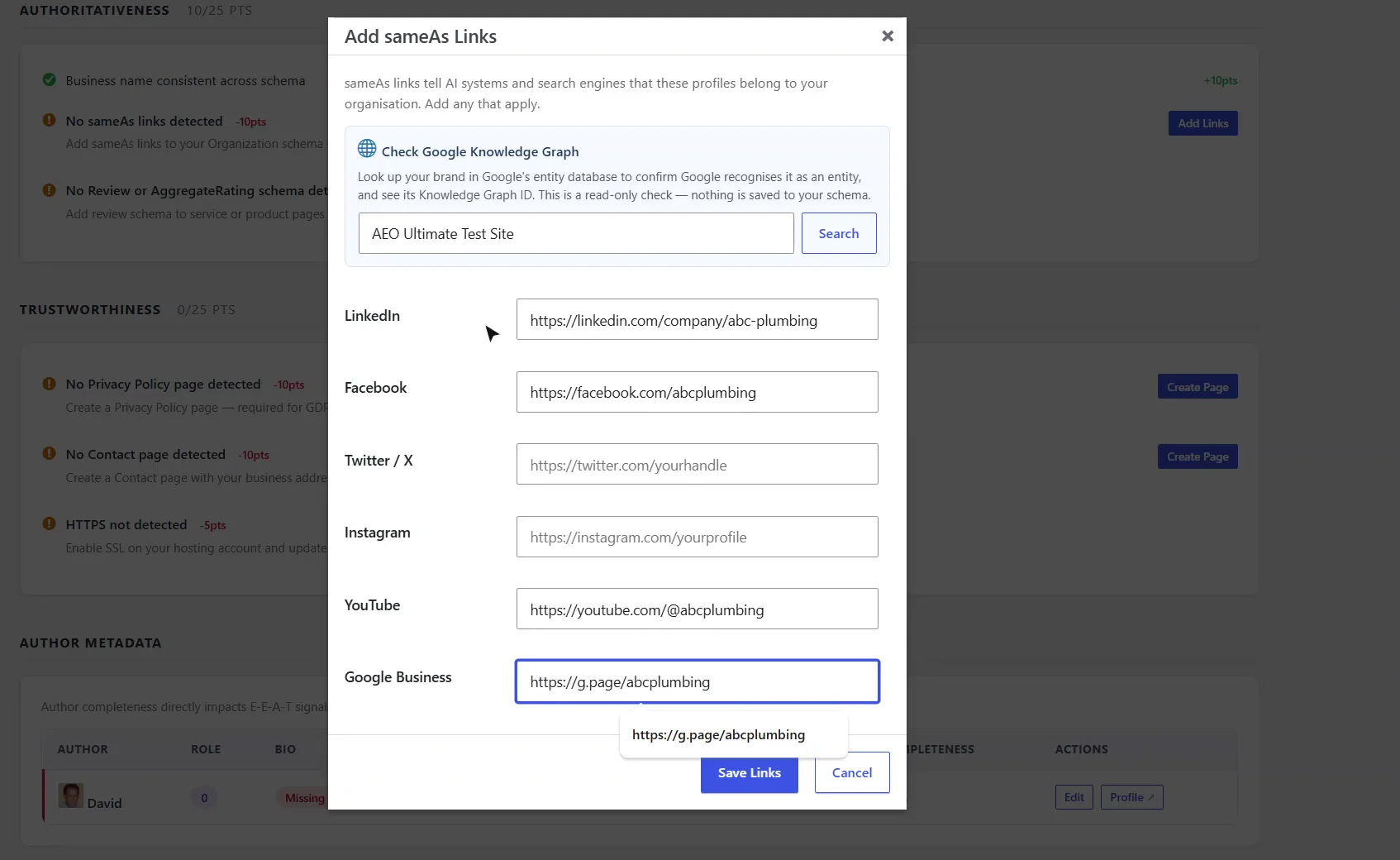
In the same window, Check Google Knowledge Graph shows whether Google already recognizes your brand as an entity. That check needs a Google API key, is read-only and changes nothing.
How do I fill in author bios and credentials?
The Author Metadata table at the bottom of the scorecard lists everyone who publishes on your site with a completeness percentage. Click Edit to add a bio, job title, credentials, areas of expertise and years of experience. These feed the Person schema AEO Ultimate outputs for each author.
Only enter what’s true
Answer engines cross-check claims against the rest of the web. An empty field costs you a few points; a credential that doesn’t check out costs you trust.
How do I fix “HTTPS not detected”?
Turn on SSL with your hosting company (most include a free certificate), then make sure both addresses under Settings → General start with https://.
What are the Author Info and Company Info tabs for?
Author Info holds each writer’s full profile. Company Info holds your business identity: name, legal name, logo, description, founding year, contact details and social profiles. Together they feed the Organization and Person schema on every page, so fill them in once and the plugin keeps them consistent everywhere.
When should I rescan?
The score updates on its own after you save links or author details. Click Rescan after you publish a new page, add an author or change your SSL setup. E-E-A-T isn’t a one-time fix: check back whenever your site’s people or pages change.
Something not adding up? See Troubleshooting or ask in the support forum.
Still stuck?
Message me directly — free tier included. Most replies land within the hour during Tampa working hours. Get support →