Most AEO tools, ours included, measure what happens before a visit: which AI crawlers read your pages and whether ChatGPT, Gemini or Perplexity cite you. Few connect any of that to a lead. When a quote request arrives, the usual answer to “did an AI assistant send this?” is a shrug.
AEO Ultimate 2.31.0 adds a small module to try. Lead Attribution tags each form entry, email-link click and phone-link tap with how likely it is that an AI assistant sent it, and shows the evidence. It’s a first step, not a complete answer, and the sections below say what it can’t see.
| Tier | What it means | How sure |
|---|---|---|
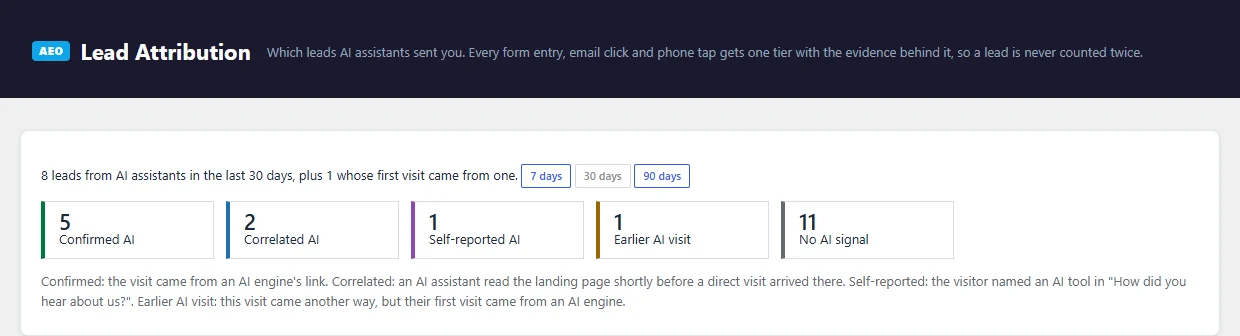
| Confirmed AI | The visit came from an AI engine’s link: a chatgpt.com, perplexity.ai, gemini.google.com or similar referrer, or ChatGPT’s utm_source tag | High |
| Correlated AI | No AI referrer, but an AI assistant fetched that exact page shortly before a direct visit landed on it | Medium; a strong hint, not proof |
| Self-reported AI | The visitor picked an AI tool in “How did you hear about us?” | As good as the answer |
| Earlier AI visit | This visit came another way, but the visitor’s first visit came from an AI engine | An assist, not the last click |
| No AI signal | None of the above | Not “not AI”, just no evidence |
Why doesn’t analytics already show which leads came from AI?
It shows part of it. Google Analytics counts sessions that arrive with an AI referrer or ChatGPT’s utm_source tag. It doesn’t tie a session to a specific form entry on your site, and most contact forms don’t record where the visitor came from.
Some AI visits also arrive with no referrer at all: a link copied out of an app, or a business name typed into the address bar after reading an answer. Analytics counts those as direct. And when ChatGPT reads your page to answer someone (the ChatGPT-User fetch), that’s OpenAI’s server, not the person. Analytics filters out bots, so it never sees that fetch. Your server does, which is where the Correlated tier comes from.
What does Lead Attribution show?
A count per tier for the last 7, 30 or 90 days, then each lead with its tier, the AI engine, the evidence, the page the visit landed on and where the visitor first came from. Each lead is counted once, under one tier, so a visitor who came from ChatGPT and also answered “ChatGPT” is one Confirmed lead with both facts shown.
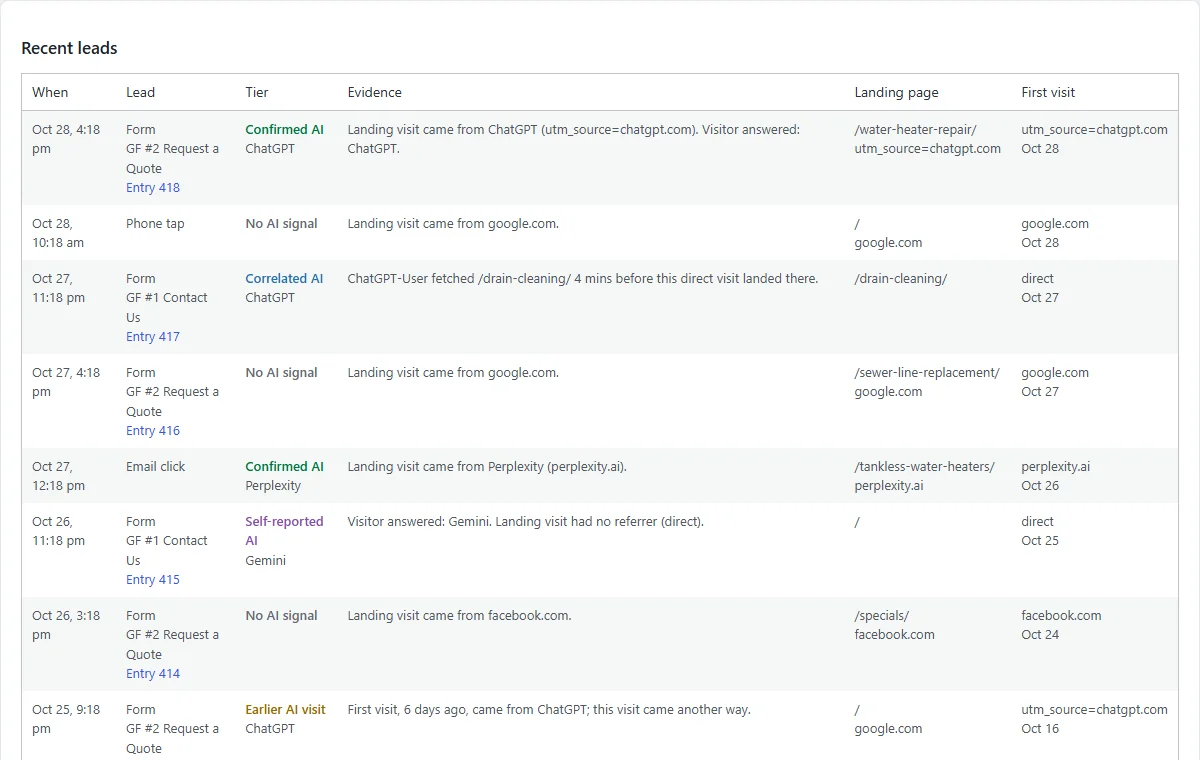
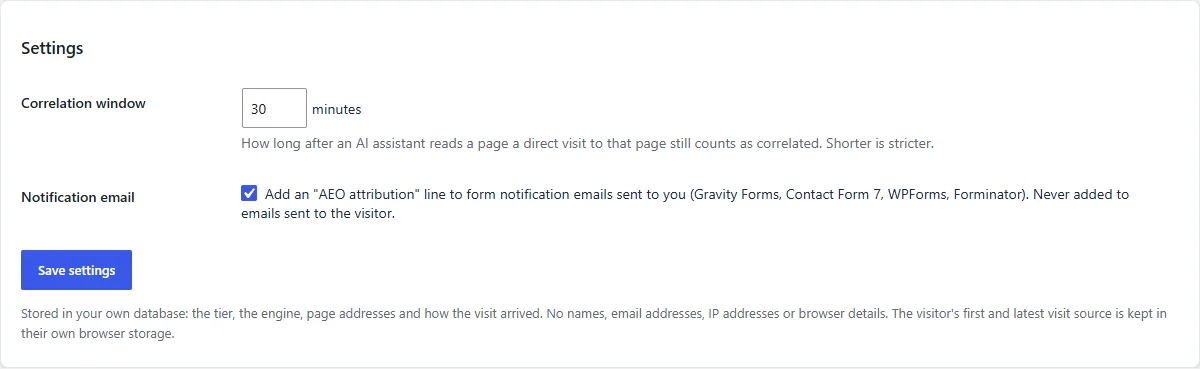
With the setting on, the same line goes at the bottom of the notification email you already get, for example: AEO attribution: Confirmed AI — Perplexity (Landing visit came from Perplexity. Visitor answered: Perplexity.) It’s never added to the copy sent to the visitor.
Why ask “How did you hear about us?”
Because it’s the one signal that doesn’t depend on tracking. Someone who read an AI answer on their phone and filled in your form on a laptop the next day leaves no trail to follow, but they can tell you. Their answer also shows whether the Correlated tier is guessing right on your site.
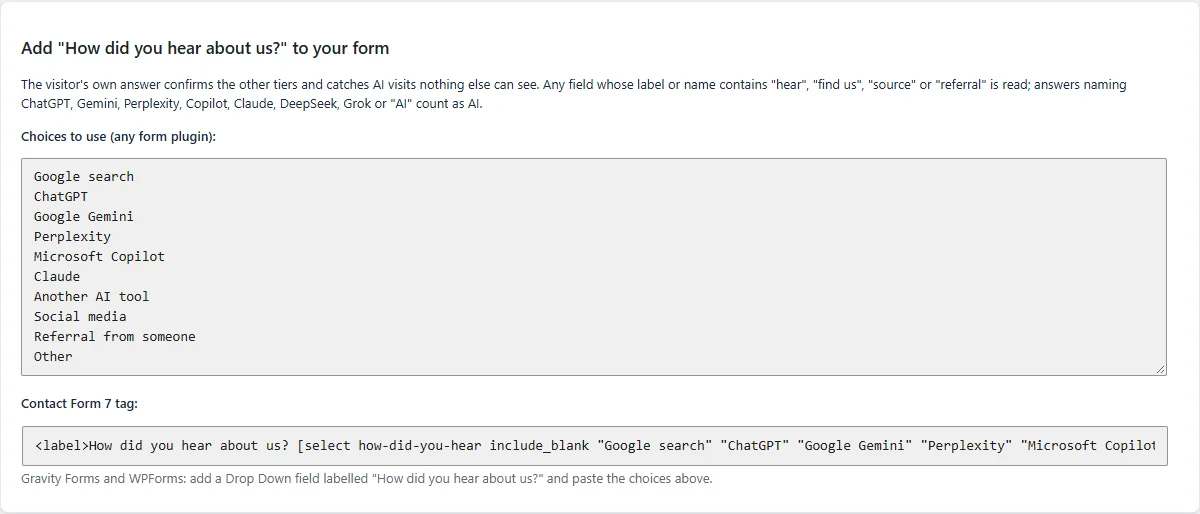
Lead Attribution reads any field whose label or name includes words like “hear”, “find us”, “source” or “referral”, and counts answers naming ChatGPT, Gemini, Perplexity, Copilot, Claude, DeepSeek, Grok or “AI”. The screen has ready-made choices to paste into your form, and a Contact Form 7 tag.
Which forms does it work with?
Gravity Forms, Contact Form 7, WPForms, Forminator and HubSpot’s embedded forms are read when the form accepts the entry, so a submission that fails validation isn’t counted. Other forms are recorded when the visitor presses submit and are marked as a submit attempt. Email and phone links are recorded on click. WooCommerce cart and checkout forms are skipped.
What happened when we tested it?
We ran test submissions on three live sites, this one, tampawebtech.com and a client site, using links from ChatGPT, Gemini, Perplexity and Meta AI, across all five form types. Each landed as Confirmed AI with the right engine, and the “How did you hear about us?” answer matched where the form asked it.
Two things came up along the way. Gravity Forms 2.9 submits forms without the browser’s normal submit event, and a performance plugin’s “Delay JavaScript” setting held our script back until the visitor clicked, so the first tests on that site recorded nothing. Both are handled in 2.31.0. And the Correlated tier never triggered: in our tests ChatGPT answered from its own search index instead of fetching the page live, so there was no fetch to match.
We’re comparing these leads with Google Analytics and HubSpot over the next few days and will update this post with what each one saw.
What can’t it see?
- Google AI Overviews and AI Mode. Clicks from them arrive as ordinary Google search visits, so they show as No AI signal unless the visitor says otherwise.
- Answers that never sent anyone. If someone read an answer and phoned you weeks later, only the “How did you hear about us?” question catches it.
- Live fetches on cached pages. When a page cache answers an AI assistant without running WordPress, the fetch isn’t logged, so Correlated undercounts on heavily cached sites. It never invents a match.
- Visitors who clear their browser. The first-visit source lives in the visitor’s own browser for 90 days; a private window or a different device starts fresh.
What does it store?
In your own WordPress database: the tier, the engine, page addresses and how the visit arrived. No names, email addresses, IP addresses or browser details. The visitor’s first and latest visit source stays in their own browser storage, and nothing is sent to us or anyone else.
How do I turn it on?
- Update AEO Ultimate to 2.31.0 or later.
- Go to TWT AEO → Modules and switch on Lead Attribution. It’s off by default.
- Clear your page cache, so cached pages pick up the new script.
- Optional: add a “How did you hear about us?” question to your form, using the choices on the Lead Attribution screen.
Leads show up under TWT AEO → Lead Attribution from then on. It pairs well with the citation side covered in How can I tell whether AI assistants are citing my website?: that post is about being named in the answer; this one is about the people who act on it.

Owner of Tampa Web Technologies Inc. and Creator of AEO Ultimate
David Chamberlain is an SEO, AEO, and GEO specialist with 17 years of experience in digital optimization. He holds a professional certification in AI Fluency: Framework & Foundations, issued by Anthropic Education, an educational division of Anthropic. Chamberlain currently owns his own business focused on search and optimization services.